Digital Signing Explained: How It Secures Your Documents

Digital signing is a cryptographic process that verifies the identity of a signer and guarantees that a document has not been altered since it was signed. Per NIST’s formal definition, a digital signature is the result of a cryptographic transformation of data that, when properly implemented, provides three specific security services:
- Origin authentication: Confirms the document genuinely came from the claimed signer
- Data integrity: Detects any change to the document after signing, even a single altered character
- Non-repudiation: Prevents the signer from later denying they signed it
- Not confidentiality: Digital signing does not encrypt the document’s content
Two foundational components make this work. A digital certificate, issued by a trusted Certificate Authority (CA), binds a signer’s identity to their public key. That certificate sits within a broader Public Key Infrastructure (PKI), the system of policies, hardware, software, and procedures that governs how keys and certificates are created, distributed, and revoked. In the United States, the ESIGN Act grants legally signed digital documents the same standing as handwritten signatures. The European Union’s eIDAS regulation does the same across member states.
How digital signing works using cryptography and PKI
The process sounds complex but follows a clear sequence. Understanding it helps you evaluate whether a signature on a document you receive is actually trustworthy.
Step 1: Hashing the document
When you sign a document digitally, the signing software runs it through a hash function, typically from the SHA family (SHA-256 is common). The output is a fixed-length string called a hash or digest. Think of it as a fingerprint: unique to that exact document. Change one word, one space, or one punctuation mark, and the hash changes completely.
Step 2: Encrypting the hash with your private key
The software then encrypts that hash using your private key, a secret cryptographic key that only you hold. The encrypted hash is the digital signature. It gets attached to the document before sending.
Step 3: Verification by the recipient
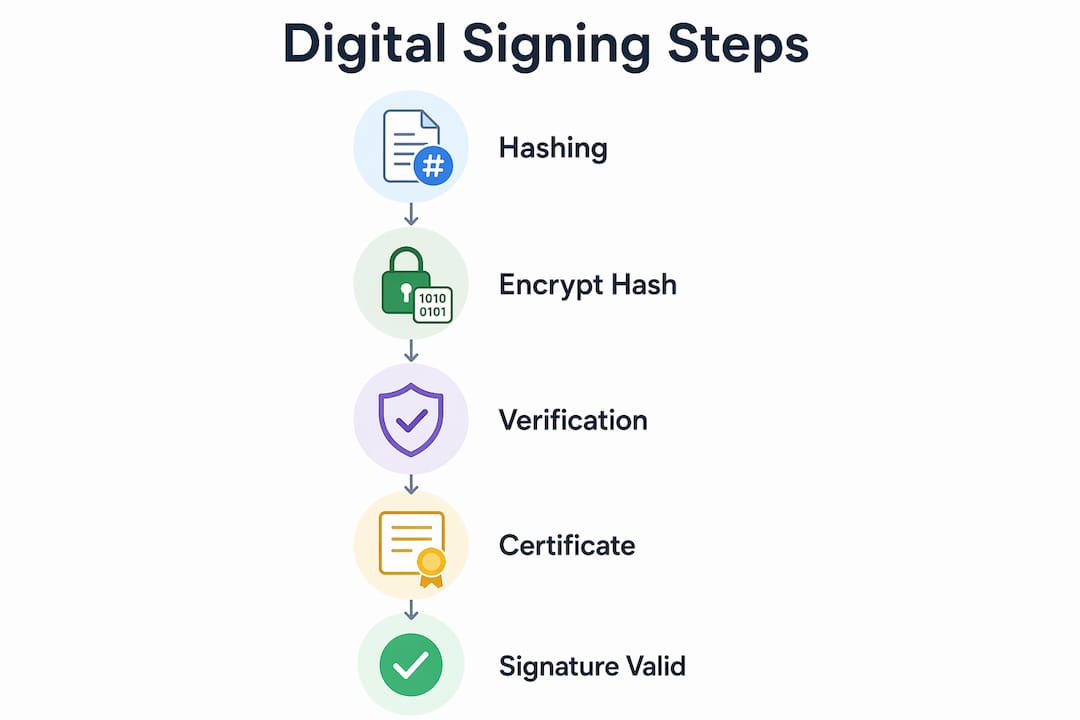
CISA explains the verification step clearly: the recipient’s software generates its own hash of the received document, then decrypts your attached signature using your public key. If the two hashes match, two things are confirmed: the document is unchanged, and it came from whoever holds the corresponding private key.
The role of digital certificates and Certificate Authorities

Your public key alone proves nothing without context. A digital certificate issued by a CA ties your public key to your verified identity, so the recipient knows the public key actually belongs to you and not an impersonator. CAs like DigiCert or government-operated trust services go through identity verification before issuing a certificate, which is why their endorsement carries weight.
Common algorithms
Algorithm choice directly affects both security strength and processing speed. RSA (Rivest-Shamir-Adleman) has been the standard for decades and remains widely supported. ECC (Elliptic Curve Cryptography) achieves comparable security with shorter keys, making it faster and better suited for mobile environments. SHA-256 and SHA-3 serve as the hash functions that generate the document fingerprint before signing.
Pro Tip: If you need to verify a digital signature manually, check the certificate chain in your PDF viewer or email client. A valid chain traces back to a recognized root CA, which is the clearest sign the signature is trustworthy.
What security guarantees do digital signatures actually provide?
Three properties make digital signatures worth using over simpler electronic alternatives. Each addresses a specific attack or failure mode.
Origin authentication
Because only the signer’s private key can produce a valid signature verifiable by the corresponding public key, the recipient can confirm who sent the document. Impersonation requires stealing the private key, which is why key protection matters so much. CISA notes that digital signatures create a unique virtual fingerprint that changes if even one character of the document is altered, making tampering immediately detectable.
Data integrity

Any modification after signing, whether intentional fraud or an accidental file corruption, breaks the hash match. The recipient’s software flags the signature as invalid. This is a meaningful upgrade over a scanned handwritten signature, which can be copied and pasted onto any document without detection.
Non-repudiation
A signer cannot later claim they did not sign the document. The private key used to create the signature is mathematically tied to their certificate, which is tied to their verified identity. Under the ESIGN Act, this non-repudiation property gives digitally signed documents legal standing in U.S. courts. The EU’s eIDAS regulation provides a similar framework, with qualified digital signatures carrying the highest legal assurance level.
Certificate-based trust infrastructure
Trust Service Providers (TSPs) and CAs form the backbone of this system. Certificates carry different assurance levels: a basic certificate verifies email ownership, while a qualified certificate under eIDAS or PSD2 requires in-person or video identity verification. Matching the certificate level to the transaction’s legal requirements is not optional in regulated industries.
Pro Tip: Match the signature type to the transaction risk. Simple electronic signatures work for low-stakes acknowledgments. For contracts, financial agreements, or legal filings, use a certificate-backed digital signature from a recognized CA.
Where digital signing gets used in practice
Digital signatures show up across industries wherever document authenticity and legal enforceability matter. The use cases below share a common thread: the cost of a forged or tampered document is high enough to justify the added verification layer.
- Contract execution: Law firms and corporate legal teams use certificate-backed digital signatures on NDAs, employment agreements, and M&A documents. The non-repudiation property is particularly valuable when disputes arise later.
- Government documents: Federal agencies and state governments in the U.S. accept or require digital signatures on tax filings, permit applications, and regulatory submissions. The IRS, for example, accepts digitally signed returns from authorized e-file providers.
- Financial transactions: Banks and payment processors use digital signatures to authenticate wire transfer instructions and loan documents. The signature confirms both the sender’s identity and that the instruction was not altered in transit.
- Email authentication: S/MIME (Secure/Multipurpose Internet Mail Extensions) uses digital certificates to sign emails, letting recipients verify the sender’s identity and confirm the message body was not modified.
- Healthcare records: HIPAA-regulated environments use digital signatures on electronic health records and prescriptions to meet audit trail requirements.
- Software distribution: Operating systems verify that downloaded software carries a valid digital signature from the publisher before installation. This is why Windows flags unsigned executables with a security warning.
- Cloud-based signing: The Cloud Signature Consortium has established standards that allow cryptographic keys to be managed by Trust Service Providers rather than stored on local hardware. This means you can sign documents securely from a phone or browser without a physical USB token.
For legal professionals in Ontario working with affidavits, statutory declarations, or notarized documents, understanding digital notary security standards is directly relevant to how these signatures hold up in legal proceedings.
Limitations you should know before relying on digital signatures
Digital signatures are not a complete security solution. They solve specific problems well and leave others entirely unaddressed.
No confidentiality
NIST is explicit on this point: digital signatures provide authenticity protection and integrity protection, but not confidentiality. Anyone who intercepts the document can read it. If the content needs to stay private, you need to encrypt the document separately, using a tool like PGP or a platform that combines signing with encryption.
Self-signed certificates create trust gaps
You can generate your own certificate without involving a CA, which is called a self-signed certificate. Self-signed certificates allow immediate signing but are not trusted by recipients unless they manually accept the certificate. In professional or legal contexts, this is a serious limitation. The recipient has no way to verify your identity through a trusted third party, which defeats much of the purpose.
Private key compromise
If your private key is stolen, an attacker can sign documents as you. The mitigation is hardware security: storing private keys on a hardware security module (HSM) or a smart card makes extraction extremely difficult. Software-based key storage on a general-purpose computer carries more risk.
Certificate lifecycle management
Certificates expire, typically after one to three years. A document signed with an expired certificate may fail validation unless the signing platform used a timestamp from a trusted timestamping authority at the moment of signing. Managing renewals, revocations, and timestamp records adds procedural overhead that organizations sometimes underestimate.
When simpler electronic signatures are enough
Not every document needs a full PKI-backed digital signature. For low-stakes agreements where the parties know each other and the legal risk is minimal, a basic electronic signature (a typed name, a checkbox, or a scanned image) may satisfy legal requirements under the ESIGN Act without the complexity of certificate management. The decision should be driven by the transaction’s risk level and any applicable regulatory requirements.
Common misconceptions about digital signing, cleared up
The terminology around digital signing is genuinely confusing, and the confusion has real consequences when people choose the wrong tool for a high-stakes document.
“Electronic signature” and “digital signature” mean the same thing
They do not. An electronic signature is a broad legal category: any electronic indication of intent to sign, including a typed name, a drawn signature, or a clicked checkbox. A digital signature is a specific technical implementation using cryptography, digital certificates, and PKI. Every digital signature is an electronic signature, but most electronic signatures are not digital signatures. The security gap between them is substantial.
- A typed name on a PDF: electronic signature, no cryptographic verification
- A certificate-backed signature verified through PKI: digital signature, cryptographically verifiable
“Digitally autographed” is a recognized term
It is not. The correct industry term is “digitally signed.” The phrase “digitally autographed” is informal and carries no defined legal or technical meaning. Using it in a contract or legal filing creates ambiguity about what verification standard was applied.
Digital signatures encrypt the document
Signing and encrypting are separate operations. A digital signature proves who signed and that the content is unchanged. It does not hide the content from anyone who intercepts the file. If you need both authenticity and privacy, you need to apply encryption on top of or alongside the signature.
A digital signature from any source is equally trustworthy
Trust depends entirely on the certificate behind the signature. A self-signed certificate and a qualified certificate from a government-recognized CA both produce a “digital signature,” but they carry vastly different identity assurance levels. For witnessing electronic signatures in a legal context, the certificate’s assurance level determines whether the signature will hold up under scrutiny.
Digital signatures are only for large organizations
Cloud-based signing platforms and Trust Service Providers have made certificate-backed digital signatures accessible to individuals and small businesses. You do not need an IT department or on-premises infrastructure. What you do need is a clear understanding of which certificate level your use case requires.
Key Takeaways
Digital signing uses cryptographic hashing and asymmetric key pairs, anchored by a Certificate Authority-issued digital certificate, to guarantee document authenticity, integrity, and signer non-repudiation under frameworks like the U.S. ESIGN Act.
| Point | Details |
|---|---|
| Three core security properties | Digital signatures provide origin authentication, data integrity, and non-repudiation, but not confidentiality. |
| How verification works | The recipient decrypts the attached hash with the signer’s public key and compares it to a freshly generated hash of the document. |
| Certificate Authorities are essential | A CA-issued digital certificate ties the signer’s identity to their public key, making impersonation detectable. |
| Self-signed certificates carry risk | Recipients must manually accept self-signed certificates, which removes the automatic trust that makes digital signing reliable. |
| Electronic vs. digital signatures | An electronic signature indicates intent; a digital signature uses PKI and cryptography to verify identity and document integrity. |