Virtual Notary Guide Ontario: 2026 Legal Breakdown

TL;DR:
- Virtual notarization in Ontario is legally authorized under O. Reg. 431/20, permitting remote affidavits and declarations via real-time video. Only licensed commissioners can perform these services, requiring specific technology like secure platforms, identity verification, and proper documentation procedures. Eligible documents include affidavits and statutory declarations, while real estate deeds and foreign documents typically require in-person notarization.
Virtual notarization in Ontario is legally permitted under O. Reg. 431/20, which authorizes remote commissioning of affidavits and statutory declarations via real-time audio-video communication. The proper industry term is remote commissioning, not “virtual notary,” though both phrases describe the same process. The Law Society of Ontario governs who can perform these services and how. This virtual notary guide Ontario residents and businesses need in 2026 covers the legal framework, required tools, step-by-step process, eligible documents, and key risks to avoid.
What technology is required for virtual notarization in ontario?
Remote commissioning in Ontario requires specific technology to be legally valid. The Law Society of Ontario mandates that both the commissioner and the deponent must see, hear, and communicate in real time throughout the session. A pre-recorded video does not satisfy this requirement.
Here is what you need before scheduling a session:
- Video conferencing platform: Zoom, Microsoft Teams, or any platform that supports live two-way audio and video without interruption
- Identity verification: Government-issued photo ID presented clearly on camera; the commissioner must confirm your identity using reliable verification methods as outlined by the Law Society
- Modified jurat: The document must include a specialized jurat format confirming the commissioning was done remotely and recording the locations of both parties
- Secure document handling: Encrypted file transfer for submitting and receiving signed documents; avoid unencrypted email for sensitive materials
- Stable internet connection: Dropped calls mid-oath can invalidate the session
Platforms supporting the virtual notarization process Ontario requires often include features like real-time ID checks and audit trails to ensure compliance and evidential integrity. These features matter because they create a verifiable record if the notarization is ever challenged.
Pro Tip: Test your video platform and document upload process at least 24 hours before your appointment. A technical failure mid-session does not pause the legal clock, and you may need to reschedule and restart the entire process.

How does the virtual notary process work in ontario?
The virtual notary process Ontario follows is structured and sequential. Skipping any step risks document rejection. Here is the complete process from start to finish.
-
Schedule your appointment. Contact a licensed commissioner or notary who offers remote commissioning services. Confirm they operate under O. Reg. 431/20 and are in good standing with the Law Society of Ontario.
-
Prepare and submit your documents. Send your unsigned document to the commissioner before the session. Do not sign it in advance. The commissioner needs to witness your signature in real time. Review the online notarization process to understand what format your document should be in.
-
Confirm your identity on camera. At the start of the session, hold your government-issued photo ID up to the camera. The commissioner will verify your name, photo, and document details. This step is non-negotiable under Ontario notary requirements.
-
Administer the oath or declaration. The commissioner reads the oath or declaration to you verbally. You respond verbally to confirm. This exchange must happen live, not via a pre-recorded script.
-
Sign the document. You sign the document while the commissioner watches via video. Depending on the platform, this may be a wet signature on a printed copy or an electronic signature on a digital file.
-
Commissioner signs and applies the modified jurat. The commissioner adds their signature, seal, and the modified jurat confirming the remote session details, including both parties’ locations.
-
Receive your notarized document. The commissioner sends you the completed document via secure file transfer or certified mail, depending on what the receiving institution requires.
Pro Tip: The most common mistake is signing the document before the session starts. If you sign early, the commissioner cannot witness your signature, and the notarization is void. Keep the document blank until you are live on camera.
What documents can be notarized virtually in ontario?
Remote commissioning is valid for specific document types in Ontario, not all of them. Understanding this distinction saves you time and prevents costly rejections.
Documents eligible for virtual commissioning:
- Affidavits (including affidavits for proof of relationship)
- Statutory declarations
- Solemn declarations
- Sworn statements
Documents that typically require in-person notarization:
- Real estate transfer documents requiring a notary public’s seal under the Notaries Act
- Certain court filings that specify physical presence
- Documents for foreign jurisdictions that do not recognize Ontario’s remote commissioning rules
- Powers of attorney in some institutional contexts
The table below summarizes the key differences:
| Document Type | Virtual Commissioning | In-Person Required |
|---|---|---|
| Affidavit | Yes, under O. Reg. 431/20 | No, unless institution requires it |
| Statutory declaration | Yes, under O. Reg. 431/20 | No, unless institution requires it |
| Real estate transfer deed | No | Yes, under Notaries Act |
| Power of attorney | Depends on institution | Often yes |
| Foreign-use documents | Depends on destination country | Often yes |
The Notaries Act does not permit notaries to notarize documents remotely beyond what O. Reg. 431/20 specifically allows. This is a critical boundary. If a provider claims they can virtually notarize any document without restriction, that claim is not supported by Ontario law. Always confirm with the receiving institution whether they accept remotely commissioned documents before proceeding.
For a detailed breakdown of document types for notarization in Ontario, review the eligibility criteria before booking your session.
What are the risks of virtual notarization and how do you avoid them?
Virtual notarization carries real risks when done incorrectly. Knowing these risks before you book protects both your documents and your legal standing.
Key risks to watch for:
- Data breaches: Sharing sensitive personal information online raises the risk of unauthorized access if the platform lacks proper encryption. Always ask your provider what security protocols they use.
- Invalid notarizations: Documents notarized by unauthorized online providers risk being rejected or legally invalid in Ontario. This is not a minor inconvenience. A rejected affidavit can delay court proceedings, visa applications, or business transactions.
- Undue influence: Remote sessions can make it harder to detect if a deponent is being pressured. The Law Society of Ontario flags this as a specific concern in its remote commissioning guidance.
- Credential fraud: Some online platforms market themselves as “virtual notaries” without holding valid Ontario credentials. Always verify the commissioner’s standing directly with the Law Society.
“Notaries should be cautious about online notary providers claiming powers beyond current Ontario legislation, as non-compliance risks document invalidation.” — Law Society of Ontario
The Law Society advises licensees to use comprehensive remote commissioning checklists covering client ID, fraud detection, and procedural safeguards. These checklists reduce the risk of errors that could void a notarization after the fact.
Pro Tip: Ask your provider for a copy of the session audit trail after completion. Reputable platforms generate a timestamped log of the session. That record is your protection if the notarization is ever disputed.
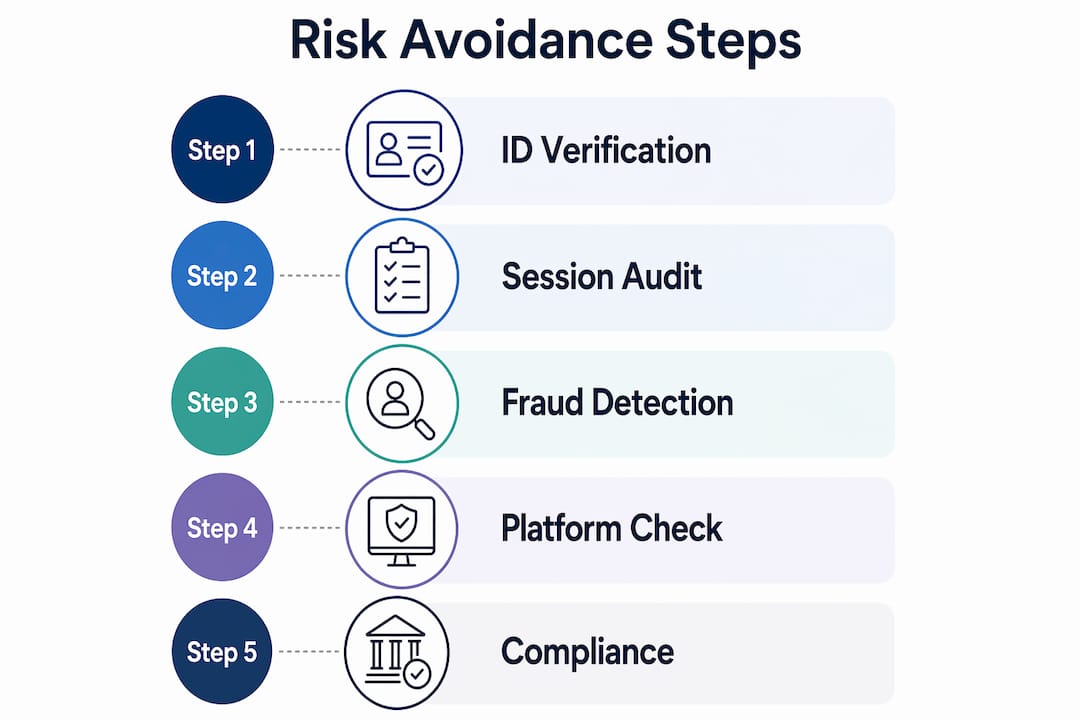
For a deeper look at virtual notary safety practices in Ontario, review the official recommendations before choosing a provider.
Key takeaways
Valid virtual notarization in Ontario requires a licensed commissioner, real-time audio-video communication, proper identity verification, and a modified jurat confirming the remote session under O. Reg. 431/20.
| Point | Details |
|---|---|
| Legal basis is specific | O. Reg. 431/20 permits remote commissioning; the Notaries Act does not allow broader virtual notary powers. |
| Technology requirements are mandatory | Real-time video, identity verification, and encrypted document handling are all required, not optional. |
| Not all documents qualify | Affidavits and statutory declarations are eligible; real estate deeds and many foreign-use documents are not. |
| Provider credentials matter | Only use commissioners in good standing with the Law Society of Ontario to avoid invalid notarizations. |
| Audit trails protect you | Request a session log after every virtual commissioning to create a verifiable record. |
What i have learned working with virtual notarization in ontario
The biggest misconception I see is that “virtual notary” and “remote commissioning” are interchangeable marketing terms with no legal weight. They are not. The phrase “virtual notary” is an informal description. The law recognizes remote commissioning under O. Reg. 431/20, and that distinction matters the moment a document gets challenged.
What concerns me more is the number of platforms operating outside that framework. The Law Society of Ontario issued a formal notice warning that online notary services claiming powers beyond O. Reg. 431/20 are not compliant with the Notaries Act. That warning exists because people are getting burned. A notarization that looks valid on paper but was performed by an uncertified provider is worthless when it counts.
My practical advice: treat credential verification the same way you treat any professional hire. Check the Law Society’s public directory before you book. Ask the provider directly which regulation authorizes their service. If they cannot answer that question clearly, walk away.
The canadian notary online workflow is genuinely more convenient than in-person visits for eligible documents. The convenience is real. So is the risk of cutting corners. The providers who do this right, like Theonlinenotary, operate transparently within the regulatory framework and can explain exactly what they can and cannot do. That transparency is the clearest signal of a trustworthy service.
— Ken
Get your documents notarized online with Theonlinenotary
Theonlinenotary provides expert online notary services for individuals and businesses across Ontario, including affidavits, statutory declarations, solemn declarations, invitation letters, and more. Every session follows O. Reg. 431/20 requirements, uses encrypted video technology, and includes a full audit trail for your records.

Services are available 24/7, so you are not limited to business hours or geographic location. Whether you need a single affidavit commissioned or ongoing notarization support for your business, Theonlinenotary delivers compliant, verified results without the wait. For a side-by-side comparison of online notary options in Ontario, review the 2025 expert comparison before you decide.
FAQ
Is virtual notarization legal in ontario?
Yes. Remote commissioning of affidavits and statutory declarations is legally permitted under O. Reg. 431/20, provided the session uses real-time audio-video communication and meets all Law Society of Ontario requirements.
What documents can be notarized virtually in ontario?
Affidavits and statutory declarations are the primary documents eligible for remote commissioning. Real estate transfer deeds and documents requiring a notary public’s seal under the Notaries Act still require in-person notarization.
How do i verify a virtual notary’s credentials in ontario?
Search the Law Society of Ontario’s public directory to confirm the commissioner holds a valid license and is in good standing. Never rely solely on a provider’s website claims.
What is the modified jurat used in remote commissioning?
The modified jurat confirms the session was conducted remotely in compliance with Ontario regulations and records the locations of both the commissioner and the deponent at the time of signing.
Can businesses use virtual notary services in ontario regularly?
Yes. Businesses that regularly require notarized documents in Ontario, such as affidavits or statutory declarations, can use remote commissioning services on an ongoing basis, provided each session meets the requirements of O. Reg. 431/20.
Recommended
- Virtual notary safety in Ontario: secure online 2026 - The Online Notary
- Is online notarization legal in Ontario? Your 2026 guide - The Online Notary
- Online Notary Guide Ontario 2026: Notarize Documents Remotely - The Online Notary
- Online Notary Public in Ontario: Services and Benefits 2025 - The Online Notary