Online Notary Verification Steps: Ontario 2026 Guide

TL;DR:
- Online notary verification involves confirming recipient acceptance, authenticating identities, and securely storing documents. Proper preparation of devices, IDs, and understanding the process help prevent common failures and document rejection. Verifying digital seals and audit trails ensures the notarized document’s validity and legal compliance.
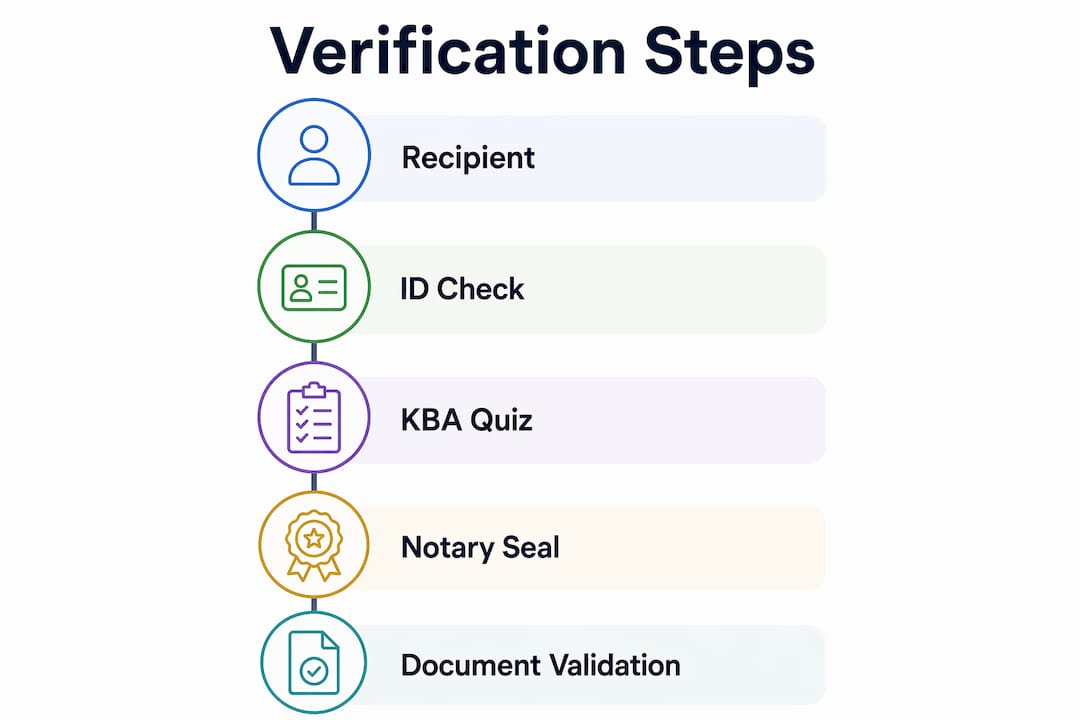
Online notary verification steps are the sequential checks that confirm a signer’s identity, validate a notarized document’s authenticity, and satisfy the legal requirements of the receiving party. In Ontario, this process is formally called Remote Online Notarization (RON), and it combines credential analysis, Knowledge-Based Authentication (KBA), and live video sessions to meet legal standards. Before you book a session with any provider, including Theonlinenotary, the single most important action is confirming that your document’s recipient accepts remote notarization. Skipping that step is the most common and costly mistake in the entire online notary verification process.
What prerequisites do you need before starting online notary verification steps?
Preparation determines whether your session succeeds or stalls. Every device, document, and platform check you complete before logging in removes a potential failure point during the live session.
Device and technical requirements
Your device must meet specific standards for the session to proceed. Audio and video capability are mandatory, along with a stable internet connection that can sustain a live video call without dropping. Most platforms require a modern browser such as Google Chrome or Mozilla Firefox, and some are incompatible with Safari on older iOS versions. Check your platform’s compatibility page before the day of your appointment.
Here is a quick reference for what you need:
| Requirement | Minimum Standard |
|---|---|
| Camera | Built-in or external webcam, 720p or higher |
| Microphone | Clear audio, no echo or static |
| Internet Speed | 5 Mbps upload and download minimum |
| Browser | Chrome 90+, Firefox 88+, or Edge 90+ |
| ID Documents | Two government-issued IDs, one with photo |
Pro Tip: Test your camera, microphone, and internet connection at least 15 minutes before your scheduled session. A failed tech check mid-session can force a reschedule and delay your document.
Confirming recipient acceptance first
Verify recipient acceptance before you book any session. Ontario-specific guidance is clear: scheduling without this confirmation risks rejection or a full redo of the notarization. Call or email the receiving office, whether it is a lender, a court registry, or a government agency, and ask two direct questions. First, do they accept remotely notarized documents? Second, do they require a specific platform or format? Get the answer in writing if possible. This single step saves more time than any other preparation you can do. Review the full preparation checklist to make sure your paperwork also meets Ontario’s legal standards before the session begins.
How does the identity verification process work step by step?
The identity verification phase is the core of the online notary verification process. It runs in three distinct stages, and each one must pass before the next begins.
-
Upload your government-issued ID. You submit the front and back of a valid photo ID, such as an Ontario driver’s license or a Canadian passport. The platform runs automated credential analysis to confirm the ID’s authenticity by checking security features, fonts, and embedded data. This step takes 30–90 seconds on most platforms. A blurry or glare-covered image will fail the scan, so photograph your ID on a dark, flat surface under bright, even lighting. For detailed guidance on this step, see how to upload ID for Ontario online notary services.
-
Complete the Knowledge-Based Authentication quiz. KBA pulls questions from your public records and credit history. Signers typically answer 4 of 5 timed questions correctly to proceed, and multiple failures can block the notarization entirely. Questions might ask about a previous address, a vehicle you once owned, or a loan from several years ago. Prepare by reviewing your credit report and having your Social Insurance Number or ITIN ready. Failing KBA twice in a row usually triggers a temporary lockout, so treat each attempt seriously.
-
Join the live video session with the notary. The notary visually inspects your ID, confirms your willingness to sign, and records the entire session. You must hold your physical ID up to the camera so the notary can match it to your face. The notary will ask you to state your name, confirm you understand the document, and declare you are signing voluntarily. The session recording becomes part of the audit trail.
Pro Tip: Have all personal information linked to your credit records ready before the KBA quiz starts. The questions are timed, and hesitation often causes avoidable failures.
After the live session, the notary applies a digital seal and cryptographic signature to the document. The completed file looks different from a paper-notarized document. It carries a visible digital seal, the notary’s electronic signature, and embedded metadata confirming the date, time, and session ID.

How do you troubleshoot common issues during online notary verification?
Verification failures are more common than most people expect, and most of them are fixable without starting over entirely.
“Repeated authentication failures may lock users out temporarily. Communication with recipients can clarify acceptable notarization formats.” — Questions Before Using an Online Notary in 2026
The most frequent problems and their solutions:
- Failed ID scan. Retake the photo in better lighting, remove any plastic sleeve or laminate cover, and make sure the entire ID fits within the frame. A dark background behind the ID dramatically improves scan accuracy.
- KBA rejection. If you fail the quiz, do not immediately retry. Review your credit report for the addresses, accounts, and vehicles on file. Contact the platform’s support team to ask about the waiting period before a retry is allowed.
- Poor video quality. Bad lighting during ID presentation can delay or prevent identity verification. Sit facing a window or a lamp, not with light behind you. Keep your ID physically in frame and steady throughout the session.
- Connection drops. Switch from Wi-Fi to a wired ethernet connection if possible. Close all other browser tabs and streaming apps before joining the session. If the call drops mid-session, rejoin immediately using the same session link. Most platforms allow reconnection without restarting the full process.
- Recipient rejects the notarization format. This is the hardest problem to fix after the fact. Contact the receiving office directly and ask what format they require. Then speak with the recipient about their acceptance policies before scheduling a new session. Some offices require a specific platform’s output, such as a PDF with embedded digital certificates, rather than a printed and scanned version.
For platform-specific audio and video troubleshooting in Ontario, the step-by-step verification guide covers the most common connectivity issues in detail.
How do you confirm and validate a notarized document after the session?
Final document validation is the step most people skip, and it is the one that protects you if a recipient questions the document’s authenticity later.
Understanding tamper-evident digital seals
Online notarization documents carry tamper-evident digital seals backed by cryptographic signatures and audit trails. These features confirm that the document has not been altered since the notary signed it. If you open the PDF in Adobe Acrobat Reader, you will see a blue ribbon or a signature panel confirming the certificate’s validity. A broken or invalid certificate means the file was modified after signing, which makes it legally void.
Using verification portals and audit trails
Most platforms provide a verification portal where any party can confirm a document’s authenticity using the session ID or a unique document code. The audit trail includes the timestamp of each action, the notary’s credential information, the KBA result, and a link to the recorded video session. Store this information alongside your notarized document. Courts, lenders, and government agencies in Ontario increasingly request audit trail access as part of their review process.
Pro Tip: Download both the notarized PDF and the audit trail report immediately after your session. Platforms archive sessions for a limited period, and having local copies protects you if the platform changes its storage policies.
Here is a comparison of key verification features across common platform types:
| Feature | Basic Platforms | Full-Service Platforms |
|---|---|---|
| Tamper-evident seal | Yes | Yes |
| Audit trail access | Limited | Full, downloadable |
| Session recording | Sometimes | Always |
| Recipient verification portal | No | Yes |
| Ontario-compliant output | Varies | Confirmed |
Remote Online Notarization carries higher security than traditional notarization because of its multi-factor identity checks and encrypted audit trails. That security advantage only matters if you download and store the complete documentation package. For a broader look at verifying online notarization in Ontario, including regulatory standards, that guide covers compliance requirements in full.
Key takeaways
Completing online notary verification in Ontario requires recipient confirmation, identity authentication, and secure document storage to be legally valid and accepted.
| Point | Details |
|---|---|
| Confirm recipient acceptance first | Contact the receiving office before booking to confirm they accept remote notarization. |
| Prepare your device and ID | Test camera, microphone, and internet speed at least 15 minutes before your session. |
| Pass KBA on the first attempt | Review your credit report and have personal records ready before the timed quiz begins. |
| Validate the digital seal | Open the notarized PDF in Adobe Acrobat to confirm the cryptographic certificate is intact. |
| Download the full audit trail | Save both the notarized document and the audit trail report immediately after the session. |
What i’ve learned after watching hundreds of ontario notarization sessions go wrong
The single biggest mistake I see is the order people follow. They research platforms, compare prices, and book a session before they ever call the receiving office. Then the document gets rejected because the lender only accepts notarizations from specific platforms, or the court registry requires a wet signature on a certified copy. All that preparation is wasted.
My firm rule: call the recipient first, get the format requirement in writing, then choose your provider. This one change eliminates the majority of failed notarizations I have seen.
The second issue is ID preparation. People assume any government-issued ID will pass credential analysis. It usually does, but a cracked screen protector on a phone camera, a laminated ID photographed under fluorescent office lighting, or an expired passport will fail the scan. I tell everyone to photograph their ID the night before using a dedicated camera or a high-resolution phone camera, not a laptop webcam, and to check the image quality before the session.
KBA is the third failure point. The questions pull from credit and public records that may be years old. Someone who moved three times in five years, or who has a common name, often gets questions about addresses or accounts they barely remember. Pulling a free credit report from Equifax Canada or TransUnion Canada the week before your session gives you the data you need to answer confidently.
The technology side is actually the easiest part to fix. A wired connection, a well-lit room, and a modern browser solve 90% of technical failures. The human preparation side is where most people underinvest.
— Ken
Get your ontario notarization done right the first time
Theonlinenotary provides online notary services for affidavits, statutory declarations, solemn declarations, invitation letters, and more across Ontario. Every session follows the full verification process described in this guide, with expert notaries who confirm your document meets the recipient’s specific requirements before you sign.

If you want a service that handles the technical setup, walks you through KBA, and delivers a fully validated document with a complete audit trail, explore Ontario notary services available 24/7. For individuals and business owners who need to get it right the first time, Theonlinenotary is built for exactly that.
FAQ
What is the first step in online notary verification?
The first step is confirming that the document’s recipient accepts remote notarization for that specific document type. Booking a session before this check risks rejection and a full redo.
How many KBA questions must you answer correctly?
Signers typically must answer 4 of 5 timed questions correctly to pass KBA. Multiple failures can block the notarization temporarily.
How do you verify a notarized document is authentic?
Open the notarized PDF in Adobe Acrobat Reader and check the signature panel. A valid cryptographic certificate and tamper-evident seal confirm the document has not been altered since signing.
What ID do you need for online notarization in ontario?
You need at least one government-issued photo ID, such as an Ontario driver’s license or a Canadian passport. Some platforms require two forms of ID, so check the platform’s requirements before your session.
What happens if the recipient rejects the notarized document?
Contact the receiving office to confirm their exact format requirements, then schedule a new session with a compliant platform. Getting format requirements in writing before booking prevents this outcome entirely.
Recommended
- Online Notary Guide Ontario 2026: Notarize Documents Remotely - The Online Notary
- Online Notary Compliance Steps for Ontario in 2026 - The Online Notary
- Online Notary Verification in Ontario: Step-by-Step - The Online Notary
- How to Verify Notary in Ontario: Step-by-Step Guide 2025 - The Online Notary