Notary for Government Programs in Ontario: 2026 Guide

TL;DR:
- Notary services for government programs in Ontario require valid ID, an unsigned document, and in-person or RON-attended presence. Remote online notarization offers faster, compliant verification using digital certificates, audit trails, and live video signing. Choosing private or certified RON notaries ensures successful notarization for complex documents and outside business hours.
A notary for government programs is a certified official who verifies your identity and witnesses your signature on documents required for legal compliance with government agencies. In Ontario, this service covers everything from affidavits and statutory declarations to permit applications and benefit enrollment forms. Getting the process wrong — submitting a pre-signed document or arriving without proper ID — results in near-certain rejection. This guide covers exactly what you need to know: the requirements, the rise of Remote Online Notarization (RON), how public and private notaries differ, and how to prepare your documents correctly the first time.
What are the notary requirements for government programs in ontario?
Government notary services follow a strict set of procedural rules. Meeting every requirement before you walk in saves you time and prevents outright refusal.
The three non-negotiable requirements are valid government-issued photo ID, an unsigned document, and your physical or digital presence before the notary. Failure to meet these causes near-100% service refusal. That statistic reflects a system with zero tolerance for procedural shortcuts.
Accepted forms of identification
The most commonly accepted IDs for notary public identification include:
- A valid Canadian passport
- An Ontario driver’s license
- A permanent resident card
- A government-issued health card (in some cases)
- A military ID or federal employee card
Bring one primary photo ID. If your name on the document differs from your ID, bring a secondary document explaining the discrepancy, such as a marriage certificate.
The document must be unsigned
Pre-signing invalidates notarization under legal regulations in Ontario and most North American jurisdictions. The notary must witness the act of signing. If you have already signed, the document is rejected and you must start over with a fresh copy.
Pro Tip: Print two copies of every government form before your appointment. If you accidentally sign one, you have a clean backup ready.
Fees and availability
Government office notary fees typically run $5–$10 per signature. Private notaries and embassy services charge up to $50 or more per signature. Most government office notary services operate Monday through Friday, 8:00 a.m. to 4:30 p.m. Plan your appointment around those hours, or consider a RON platform for after-hours access.
How is remote online notarization changing government workflows?
Remote Online Notarization is the legally compliant process of notarizing documents through a secure video call, using digital certificates to authenticate the notary’s identity and the document’s integrity. Ontario residents increasingly use RON for permits, licensing applications, and procurement documents.

RON platforms deliver 50–70% faster document completion compared to traditional in-person notarization. That speed advantage matters when government deadlines are firm and office hours are limited.
Why government agencies are accepting RON
The shift toward RON is driven by the need for stronger identity verification and document integrity in government workflows. IdenTrust’s eNotary standards require digital certificates that comply with both state and federal law, confirming the notarization is legally authentic. Every RON session also produces a tamper-evident audit trail and a video recording of the signing event, which gives government agencies a verifiable record they can reference if a document is ever disputed.
Here is how a compliant RON session works for a government document:
- Schedule your session on a certified RON platform that meets Ontario’s legal standards.
- Upload your unsigned document to the platform before the session begins.
- Verify your identity using a government-issued photo ID presented on camera, plus knowledge-based authentication questions.
- Sign the document digitally in the notary’s presence during the live video session.
- Receive the notarized document with a digital certificate and audit trail attached, ready for government submission.
Verifying a certified digital notary
Not every online notary service meets government compliance standards. Confirm that the platform uses certified digital certificates before you book. Ask the provider directly whether their credentials comply with Ontario’s Electronic Commerce Act and the relevant federal standards. A legitimate certified notary for government forms will answer that question without hesitation.
Pro Tip: Check whether the RON platform provides a downloadable audit trail with each notarized document. Government agencies increasingly require this record for procurement and licensing submissions.
Public vs. private notaries: which one do you need?
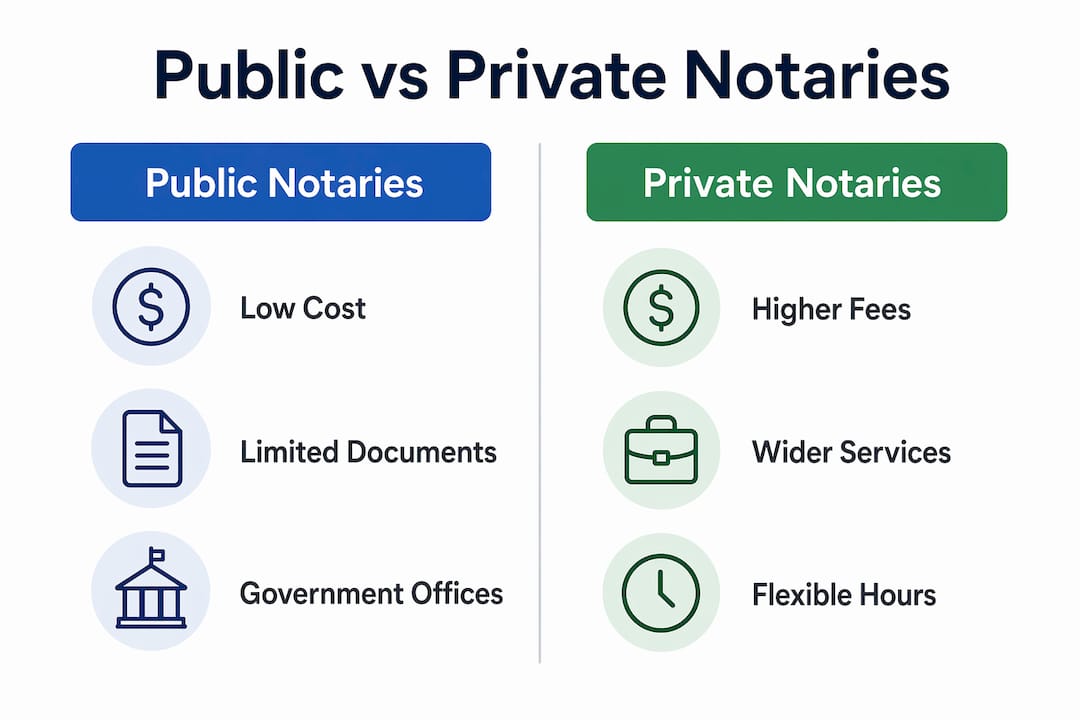
The distinction between public (government-employed) notaries and private notaries matters more than most people realize. Choosing the wrong type can mean your document is notarized but still rejected by the agency that requested it.
Some government agencies offer in-house notary services at no additional fee, but they restrict notarization strictly to documents related to their own agency’s programs. Clients must confirm eligibility at least 48 hours in advance. That restriction is the critical detail most people miss.
| Feature | Public (Government) Notary | Private Notary |
|---|---|---|
| Cost | $0–$10 per signature | $25–$50+ per signature |
| Document scope | Agency-related documents only | Most government and legal documents |
| Availability | Weekdays, business hours only | Flexible, including RON after hours |
| Legal advice | Not provided | Not provided |
| Complex documents | Often restricted | Generally accepted |
| Scheduling | 48-hour advance confirmation often required | Same-day or next-day often available |
Both public and private notaries share one firm boundary: they verify identity and witness intent, but they do not provide legal advice or help draft documents. Arrive with a fully completed form. The notary’s job is to confirm you are who you say you are and that you are signing willingly.
Public libraries and municipal clerks often do not notarize complex government documents like wills, deeds, or multi-party affidavits due to legal limitations. They focus on simple administrative documents. If your government program requires a statutory declaration or a sworn affidavit, a private notary or a RON platform is the right choice.
For a deeper breakdown of how these two categories differ under Ontario law, the guide on public vs. private notary differences covers the legal authority distinctions in detail.
How to prepare for government document notarization in ontario
Preparation is where most people lose time. A single missing field on a form or a forgotten piece of ID turns a 20-minute appointment into a second trip.
Follow this checklist before every notarization appointment:
- Complete the entire document before arriving. Fill in every field, including dates, addresses, and full legal names. Leave the signature line blank.
- Bring valid government-issued photo ID. Your passport or driver’s license is the safest choice.
- Confirm your eligibility for in-house government notary services at least 48 hours in advance if you plan to use an agency office.
- Bring the original document, not a photocopy. Most government agencies require the notary to view the original.
- Know your document type. Affidavits, statutory declarations, and solemn declarations each have specific formats. Confirm which one the program requires before you print anything.
Scheduling your appointment
Walk-in notary services exist at some municipal offices, but availability is inconsistent. Booking an appointment in advance is the more reliable approach. For RON, most certified platforms offer same-day scheduling with sessions available outside standard business hours. If your government deadline is tight, a RON platform removes the scheduling risk entirely.
Pro Tip: Call the specific government office before your visit and ask whether their notary is available that day. Staff turnover and leave can make in-house notary services temporarily unavailable with no public notice.
The step-by-step guide on how to prepare for online notary sessions walks through the document and ID preparation process in detail, including what to do if your name appears differently across documents.
Key takeaways
Notarization for government programs in Ontario requires valid photo ID, an unsigned document, and either in-person or RON-compliant presence before a certified notary.
| Point | Details |
|---|---|
| Documents must be unsigned | Signing before the notary witnesses it invalidates the notarization and causes rejection. |
| RON speeds up the process | Certified RON platforms complete government notarizations 50–70% faster than in-person methods. |
| Public notaries have limited scope | Government office notaries only handle agency-related documents and require advance confirmation. |
| Private notaries offer more flexibility | Private and online notaries accept a wider range of government documents with flexible scheduling. |
| Preparation prevents delays | Completing forms fully and bringing valid ID before your appointment eliminates the most common errors. |
What i’ve learned working with government notarizations in ontario
The single most preventable mistake I see is signers who show up with a document they have already signed. They assume the notary can just witness the existing signature. The notary cannot. The document is void the moment it is pre-signed, and the government agency will reject it. I have watched people lose weeks of processing time over this one error.
The second pattern I notice is people underestimating the scope restrictions of government office notaries. Someone applies for a housing assistance program, goes to the nearest government office for notarization, and discovers the in-house notary only handles documents specific to that office’s own programs. They leave empty-handed and scramble to find a private notary before the deadline.
My honest recommendation: unless you are certain the government office notarizes the specific document type you need, go directly to a private notary or a RON platform. The cost difference is real, but the time you save is worth more than the fee gap. For anything involving affidavits, statutory declarations, or multi-party government forms, a certified private notary with RON capability is the most reliable path.
Verifying credentials matters more than most people think. Ask any online notary provider whether their digital certificates comply with Ontario’s Electronic Commerce Act. A credible provider answers immediately. If there is hesitation, find another provider.
— Ken
Get your government documents notarized online with Theonlinenotary
Theonlinenotary provides certified online notarization services for Ontario residents and businesses dealing with government program requirements. Whether you need an affidavit notarized for a benefits application, a statutory declaration for a licensing submission, or a solemn declaration for a federal form, Theonlinenotary handles it through a secure, compliant RON session.

Appointments are available beyond standard business hours, and every session produces a tamper-evident audit trail that government agencies accept. Identity verification meets Ontario’s legal standards, and the process takes minutes rather than days. Visit the online notary services page to book your session and get your government documents notarized without the scheduling headaches.
FAQ
What documents require a notary for government programs?
Common documents include affidavits, statutory declarations, solemn declarations, consent forms, and permit applications. The specific requirement depends on the government program, so confirm the document type with the agency before booking.
Can i use a RON platform for government notarizations in ontario?
Yes, provided the platform uses certified digital certificates that comply with Ontario’s Electronic Commerce Act and applicable federal standards. Always confirm compliance before your session.
What happens if i sign my document before seeing the notary?
Pre-signing invalidates the notarization. The notary must witness the act of signing. Bring an unsigned document to every appointment.
Do government office notaries charge a fee?
Government office notaries typically charge $5–$10 per signature, and some agency notaries provide the service at no cost for eligible clients. Private and online notaries charge more but offer broader document scope and flexible scheduling.
Can a notary help me fill out my government form?
No. Notaries verify identity and witness signatures; they do not provide legal advice or assist with completing documents. Arrive with a fully filled-out form and leave the signature line blank.