ID Notary in Ontario: Secure Online Identity Verification

TL;DR:
- Online notarization in Ontario is limited to remote commissioning of affidavits and declarations, not full notary services.
- Only Law Society of Ontario licensed lawyers and paralegals can perform remote commissioning with secure ID verification.
- Most eligible documents can be processed online, offering significant time and cost savings over in-person visits.
Many Ontarians searching for an “online notary” are surprised to discover that what they find online is not always what the law actually permits. The gap between marketing language and legal reality causes real problems: rejected documents, wasted appointments, and unnecessary stress. Whether you need an affidavit for a court proceeding, a statutory declaration for an insurance claim, or an invitation letter for a visa application, understanding what is truly legal online versus what still requires a physical office visit is the first step to getting it right. This guide breaks down the key distinctions, walks you through the secure ID verification process, and helps you identify exactly which documents qualify for online processing in Ontario.
Table of Contents
- Understanding online notary vs. remote commissioning in Ontario
- How online ID verification works for remote commissioning
- Which documents can and cannot be notarized online in Ontario?
- Benefits and costs of using online ID notary services
- What most people get wrong about ID notary services in Ontario
- Get secure ID notary and remote commissioning services online
- Frequently asked questions
Key Takeaways
| Point | Details |
|---|---|
| Remote commissioning defined | Notary public seal still requires in-person meetings, but remote commissioners can witness affidavits and declarations by video in Ontario. |
| ID verification is critical | Live video sessions require valid photo ID for secure and legal identity confirmation. |
| Choose the right service | Understand which documents can be handled online and always confirm recipient acceptance before proceeding. |
| Save time and money | Online sessions are fast, affordable, and highly rated compared to traditional approaches. |
Understanding online notary vs. remote commissioning in Ontario
The terms “notary public” and “commissioner of oaths” are often used as if they mean the same thing. They do not, and the difference has direct legal consequences for your documents.
A notary public in Ontario is typically a lawyer appointed to perform a narrower set of formal functions: certifying true copies of original documents, authenticating signatures for international use, and administering oaths in certain formal contexts. A commissioner of oaths, on the other hand, is authorized to witness signatures on affidavits, statutory declarations, and solemn declarations. Both roles involve identity verification, but the rules around where and how that verification can happen are very different.
Here is where the law draws a clear line. Online notary legality in Ontario is governed by a strict framework: online notarization is not permitted under the Notaries Act, which requires physical presence for notary services like certified true copies. However, remote commissioning of oaths, affidavits, and statutory declarations is allowed under O. Reg. 431/20 via live audio-visual communication. This distinction is not a technicality. It determines whether your document will be legally recognized by courts, government offices, and international institutions.
What does this mean practically? It means most services that advertise “online notary” in Ontario are, from a legal standpoint, providing remote commissioning services. They can legally commission affidavits and declarations over video call, but they cannot replace the physical notary seal required for certified true copies or documents bound for use in other countries.
Here is a quick breakdown of the key differences:
- Notary public (in-person only): Certified true copies, authentication for international documents, apostilles
- Commissioner of oaths (can be remote): Affidavits, statutory declarations, solemn declarations, invitation letters with sworn statements
- Who can do it remotely: Only LSO-licensed lawyers and paralegals
- Technology required: Live audio-visual connection, real-time ID check, signed jurat noting remote method
“Many people book an online appointment expecting a full notary service, only to find out their document needed an in-person seal. Knowing the difference before you book can save you significant time and money.” — A common frustration echoed across Ontario legal help forums
The services and benefits of online notary work seamlessly when you match the right document type to the right service. The confusion is understandable given how widely the term “online notary” is used in advertising, but the legal framework is unambiguous.
How online ID verification works for remote commissioning
With the legal context established, let’s dive into exactly how online ID verification secures the process during remote commissioning.
Remote commissioning is not simply a video call where you sign a paper and wave at a camera. It is a structured, regulated process with specific requirements under O. Reg. 431/20. Understanding each step helps you show up prepared and ensures your document is legally sound from the start.
Here is how a typical session works:
- Schedule your appointment. You book a session online, upload a draft of your document or describe what you need, and select a time that works for you. Many providers offer same-day appointments.
- Join the video session. At the scheduled time, you connect via a secure video platform with an LSO-licensed lawyer or paralegal acting as commissioner.
- Present your government-issued photo ID. You hold your ID up to the camera clearly so the commissioner can verify your identity. The remote commissioning process requires real-time video where the commissioner verifies identity using government-issued photo ID such as a driver’s license or passport, witnesses the signing, uses a modified jurat noting the remote method and locations, and keeps records.
- Read and sign the document. You declare the contents of your affidavit or declaration are true, and you sign while on camera.
- Commissioner completes the jurat. The commissioner signs and applies their seal, noting that the oath was administered remotely. The document is then delivered to you electronically or by mail.
Knowing what ID is acceptable saves you from scrambling at the last minute. According to notary public identification needed guidelines, the following documents are typically accepted:
- Ontario driver’s license (with photo)
- Canadian passport
- Permanent resident card
- Canadian citizenship card with photo
- Federal or provincial government-issued photo ID
For the identification requirements in Ontario, your ID must be current, not expired, and the name on the ID must match the name on your document exactly. Discrepancies, even minor ones like a missing middle name or a nickname, can create complications.

Record-keeping is also a regulated part of the process. Commissioners are required to keep records of the session, the identity verification, and the document signed. Your personal information is handled under applicable privacy legislation, and reputable providers use encrypted platforms to protect your data.
Pro Tip: Before your session, have your document open on your screen and your ID physically in your hand. Do a quick test of your camera and microphone. These small preparations can cut your session time in half.
Which documents can and cannot be notarized online in Ontario?
Understanding ID verification is only half the picture. Knowing which documents you can actually process online is just as vital.
The distinction between what is eligible for remote commissioning and what still requires an in-person notary is not always obvious from a document’s name alone. Some documents sound formal and legal but fall squarely within the commissioner’s remote authority. Others, despite seeming routine, require a physical notary seal to be recognized.
| Document type | Can be done remotely? | Notes |
|---|---|---|
| Affidavit of residence | Yes | Widely accepted for insurance and government use |
| Statutory declaration | Yes | Commonly used for name changes, benefits, and legal proceedings |
| Solemn declaration | Yes | Accepted in courts and administrative bodies |
| Invitation letter (sworn) | Yes | For visa applications and immigration purposes |
| Certified true copy | No | Requires physical notary with in-person verification |
| Authentication for international use | No | Must be notarized in person, often followed by apostille |
| Power of attorney (certain types) | Verify first | Requirements vary by jurisdiction and recipient |
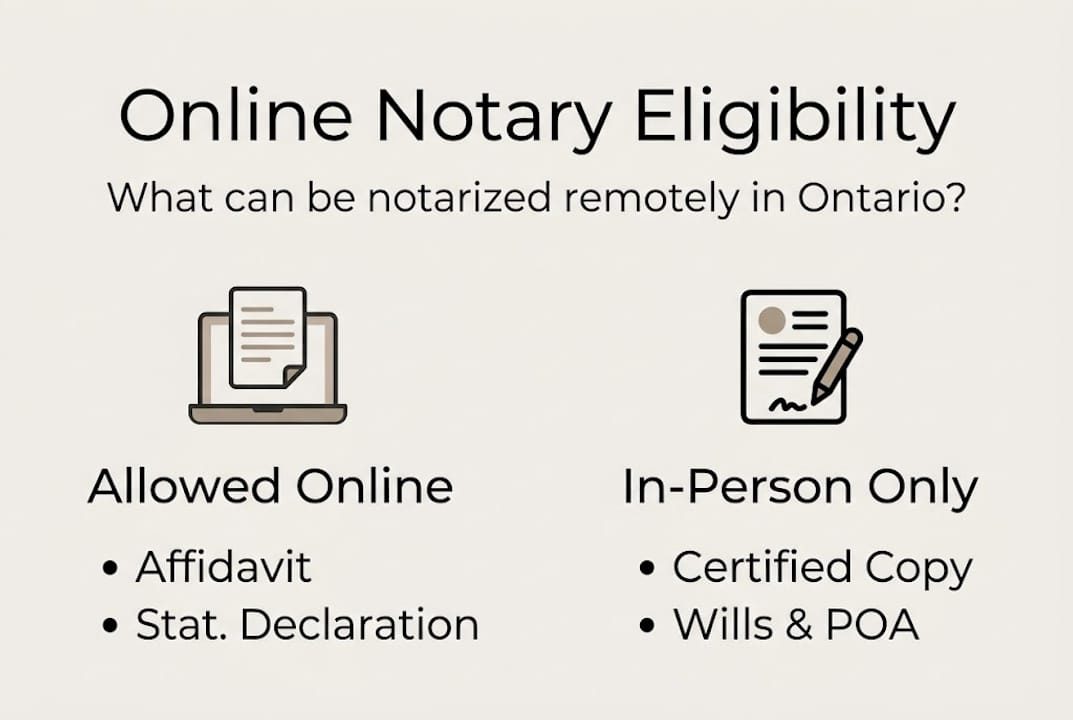
Notary services explained in detail make clear that affidavits and statutory declarations cover a huge range of everyday needs: proving relationship status, confirming a change of address, supporting insurance claims, verifying income, or supporting a family member’s visa application. These are the documents most Ontarians actually need, and they can all be processed online.
Here is where things get complicated: services market as “online notary” but provide remote commissioning legally. Some documents are accepted widely, while others need direct confirmation from the receiving institution. That marketing gap creates real risk.
Common documents eligible for remote commissioning include:
- Affidavits for court filings (confirm with your lawyer first)
- Statutory declarations for employment, benefits, or government programs
- Solemn declarations for administrative purposes
- Sworn invitation letters for visa or immigration applications
Before you book a session, always contact the institution receiving your document. Ask them directly: “Will you accept a document commissioned remotely by an LSO-licensed professional under O. Reg. 431/20?” Most Canadian courts and government agencies say yes. Some foreign institutions require a physical notary seal, and finding that out early prevents a frustrating do-over.
If you need to complete a statutory declaration online, the process is straightforward once you confirm acceptance with the recipient. The actual signing session typically takes less time than driving to and parking at an in-person office.
Benefits and costs of using online ID notary services
Now that you know what you can notarize online, let’s look at the concrete benefits, both financial and practical, of using remote services.
The most obvious advantage is time. In-person notary or commissioning appointments often require travel, waiting rooms, and scheduling around office hours that rarely fit a working person’s day. Remote sessions eliminate all of that. Providers report 99% satisfaction and time savings of up to 40% compared to in-person visits, with most sessions completing in under ten minutes. That is less time than it typically takes to find parking downtown.
Here is a cost comparison that gives you a realistic picture of what to expect:
| Service | Online remote commissioning | Typical in-person visit |
|---|---|---|
| First document | $37.99 | $50 to $100+ |
| Each additional document | $24.99 | $25 to $50 per document |
| Travel time | Zero | 30 to 90 minutes round trip |
| Wait time | Zero | 15 to 45 minutes |
| Availability | Often same day | Appointment lead time varies |
The benefits of online notary services extend beyond cost savings. Flexibility is a major factor. If you live in a rural area of Ontario, finding a licensed commissioner nearby can be genuinely difficult. Remote commissioning makes geographic barriers irrelevant. You can complete your statutory declaration from Timmins just as easily as from downtown Toronto.
For small business owners, the efficiency gains are even more meaningful. If you regularly need commissioned documents, whether for employee affidavits, business declarations, or client-facing legal requirements, consolidating those sessions online saves both administrative time and billable hours.
Accessibility is another underappreciated benefit. People with mobility challenges, medical conditions, or caregiver responsibilities often struggle to make it to in-person appointments. Remote commissioning removes that barrier entirely. You can complete the session from your home, your office, or anywhere with a stable internet connection.
Pro Tip: If you have more than one document that needs commissioning, schedule them all in a single session. You will pay a lower rate per document, and the commissioner can process multiple affidavits or declarations back to back without you having to reschedule.
Document handling support is also worth noting. Many providers will review your document before the session to flag any issues, confirm the correct format for your jurat, and advise on what statement wording is appropriate for your situation. That kind of pre-session support prevents errors that could make a document unacceptable.
What most people get wrong about ID notary services in Ontario
Here is a reality check that most guides skip over entirely.
The term “online notary” has become so common in Ontario that people treat it as a standard, uniform service. It is not. When someone says they “got it notarized online,” they might mean three different things: they used a legitimate remote commissioning service under O. Reg. 431/20, they used a service that is technically operating outside the law, or they signed something digitally with no actual commissioner involved at all.
Each of these outcomes produces a document with a very different legal status, and most people have no idea which category their document falls into until it gets rejected.
We see this pattern frequently. Someone books an online session based on a Google search, uploads their document, clicks through a digital signature process, and receives a stamped PDF. Then the court, government office, or foreign consulate rejects it because LSO-licensed lawyers/paralegals only can legitimately administer remote oaths in Ontario, and the service they used was not operating within that framework.
The financial cost of getting this wrong is real. You may pay for a service, wait days for your document, submit it to a time-sensitive process, and then have to start over. In visa applications and legal proceedings, that kind of delay can have serious consequences.
Our strongest piece of advice: before booking any online notary or commissioning service, confirm two things. First, is the commissioner an LSO-licensed lawyer or paralegal? Second, will the institution receiving your document accept a remotely commissioned document? Those two questions protect you against every common failure mode in this space.
Online notary accessibility in Ontario is genuinely improving, but only for people who understand what they are actually accessing. The law is clear, the process is secure, and the benefits are real. The risk only appears when people skip the verification step and assume all online services are equivalent.
Get secure ID notary and remote commissioning services online
Ready to act? Here is the easiest way to get your documents legally commissioned or notarized online in Ontario.

At The Online Notary, every session is handled by LSO-licensed professionals who follow O. Reg. 431/20 to the letter. The booking process is simple, the ID verification is secure, and most sessions wrap up in under ten minutes. Whether you need an affidavit, a statutory declaration, a solemn declaration, or a sworn invitation letter, you can access our full range of Ontario online notary services from wherever you are in the province. If you want to know exactly what to expect before you book, our step-by-step online notarization guide walks you through the entire process in plain language.
Frequently asked questions
Can I get any document notarized online in Ontario?
No. Only documents like affidavits and statutory declarations can be commissioned online. Certified true copies and documents requiring authentication for international use still need in-person notarization, as online notarization is not permitted under the Notaries Act for those document types.
What identification do I need for an online commissioning session?
You need a valid government-issued photo ID such as a driver’s license, passport, or permanent resident card. The remote commissioning process requires real-time video where the commissioner verifies your identity using that ID before witnessing your signature.
Who can act as a remote commissioner in Ontario?
Only lawyers and paralegals licensed by the Law Society of Ontario can commission documents remotely. This is a firm legal requirement, and documents commissioned by unlicensed individuals may not be recognized by courts or government agencies. LSO-licensed lawyers/paralegals only have this authority in Ontario.
How fast can I get my documents commissioned online?
Most remote commissioning sessions take under ten minutes to complete. Providers report time savings of up to 40% compared to in-person visits, and many services offer same-day appointments, making this option significantly faster than traditional alternatives.