How to get documents notarized by a lawyer in Ontario

TL;DR:
- Notarization in Ontario involves verifying identity, witnessing signatures, and certifying documents by licensed professionals.
- Remote notarization is limited to certain affidavits and declarations with real-time ID verification, full notarization often requires in-person visits.
- Proper preparation and understanding Ontario-specific rules prevent delays and document rejection for legal and international purposes.
You finally have everything ready for your immigration application, business deal, or international contract, and then someone tells you the document needs to be notarized by a lawyer. Suddenly, a simple task feels surprisingly confusing. Can you do it online? Does it have to be in-person? What exactly does “notarized” even mean in Ontario? These are questions that trip up individuals and small businesses every day. This guide walks you through every step of the lawyer notarization process in Ontario, including what the law actually allows for remote services, so you can move forward without guessing.
Table of Contents
- Understanding legal notarization requirements in Ontario
- Gathering the right documents and materials
- Step-by-step process: How a lawyer notarizes your document
- Troubleshooting: Common mistakes and verification tips
- Why understanding notarization rules is essential in Ontario
- Get expert help with legal notarization in Ontario
- Frequently asked questions
Key Takeaways
| Point | Details |
|---|---|
| Remote commissioning allowed | Ontario permits remote commissioning of affidavits and statutory declarations if real-time ID verification is completed. |
| Full notarization needs in-person | Most true copies and international documents must be notarized in person by a lawyer or notary. |
| Preparation is key | Having the correct documents and identification ready saves time and streamlines notarization. |
| Avoid common errors | Careful review of signatures, dates, and document details prevents rejection or delays. |
| Expert help available | Online and traditional notary services in Ontario can simplify and expedite legal notarization. |
Understanding legal notarization requirements in Ontario
Before you book an appointment or upload a file, it helps to understand what notarization actually is and why it matters. Many people use the word loosely, but in Ontario, “notarization” has a specific legal meaning.
Notarization is the formal process in which a qualified legal professional verifies your identity, witnesses your signature, and certifies a document as authentic. It signals to institutions, governments, and foreign authorities that the document is genuine and was signed under oath or affirmation. Without it, many documents are simply not accepted.
In Ontario, who can notarize documents falls into three categories:
- Lawyers licensed by the Law Society of Ontario (LSO) can both commission documents and provide full notarization
- Notaries public can commission oaths and declarations but may have limited authority depending on jurisdiction
- Commissioners of oaths are authorized for specific types of declarations but cannot certify true copies or perform full notarization
This distinction matters more than most people realize. Commissioning an oath and fully notarizing a document are not the same thing. Commissioning means witnessing a signature on a sworn statement. Full notarization goes further, certifying that a copy is a true reproduction of an original or authenticating signatures for international use.
Regulatory note: Since 2020, remote commissioning is permitted in Ontario under O. Reg. 431/20, which allows lawyers and commissioners to witness oaths, affidavits, and statutory declarations via live video, provided identity is verified in real-time. However, full notarization, including true copy certification and signatures intended for international use, still requires in-person attendance. Lawyers and notaries must follow LSO best practices throughout.
Understanding these boundaries helps you figure out whether your specific document can be handled remotely or whether you need to visit an office. Review the full Ontario notarization steps to match your document type to the right service.
Pro Tip: Before booking any notarization service, check whether the lawyer is in good standing with the Law Society of Ontario using the LSO’s public directory. For remote commissioning, confirm the service uses live video with real-time ID verification, not pre-recorded footage or email.
One key thing to keep in mind: Ontario’s rules differ from other Canadian provinces. What works in British Columbia or Quebec may not satisfy an Ontario requirement. Always verify the requirements for notarization before assuming one approach applies everywhere.
Gathering the right documents and materials
Once you understand who can help and the legal backdrop, the next step is gathering what you will need. Many notarization requests get delayed not because of scheduling conflicts, but because the applicant showed up unprepared. Knowing exactly what to bring, whether in-person or online, saves time and prevents frustration.
Here is a checklist of what you typically need depending on your document type:
For affidavits:
- The completed affidavit draft, reviewed for accuracy before the appointment
- Government-issued photo ID (passport, driver’s license, or provincial ID card)
- Any supporting exhibits referenced in the affidavit, labeled and attached
For statutory declarations:
- The completed declaration, with your full legal name matching your ID exactly
- Photo ID, same standard as above
- Confirmation of the purpose (some uses require a specific form)
For true copy certification:
- The original document to be copied (the lawyer must see the original)
- A clean photocopy of the original
- Photo ID
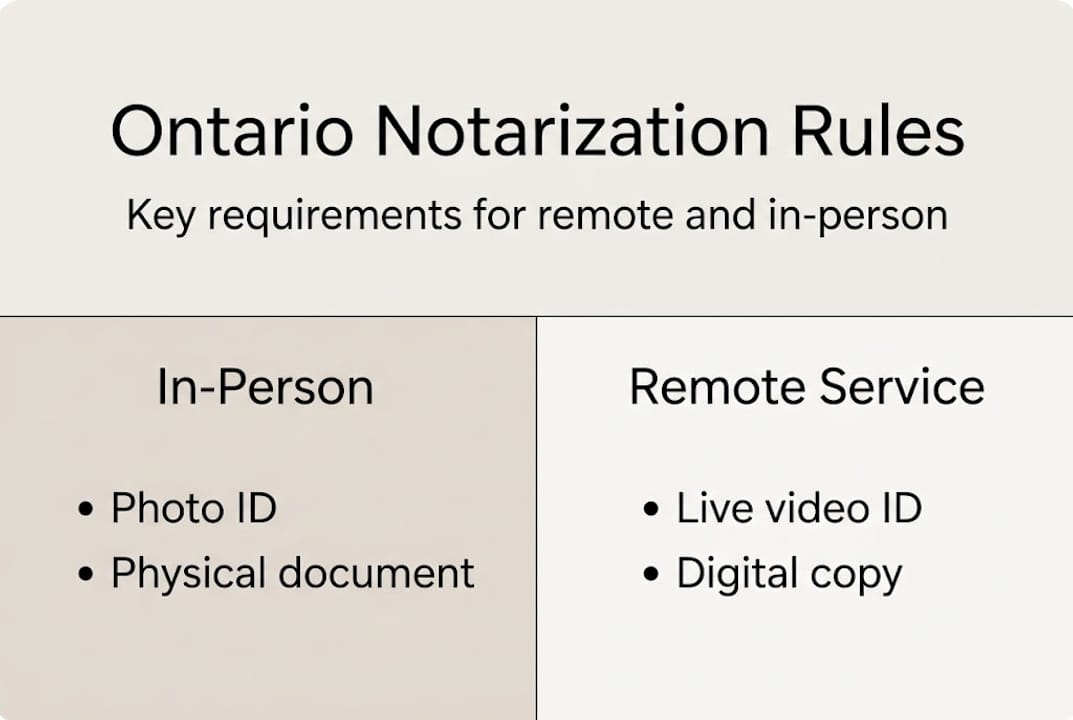
Identification is non-negotiable. For in-person appointments, a single government-issued photo ID is usually sufficient. For remote commissioning under online notary legalities, the ID must be held up clearly to the camera so the commissioner can verify it in real-time. Some services also ask for a secondary piece of ID to satisfy their internal protocols.

Here is a quick comparison to help you prepare:
| Requirement | Traditional (in-person) | Remote commissioning |
|---|---|---|
| Government photo ID | Physical, presented in person | Shown clearly via live video |
| Original document | Must be physically present | Digital copy shared via secure link |
| Witness | Sometimes required in person | Must be visible on video call |
| Signed document | Wet signature in front of lawyer | Signed on screen or prior to call with lawyer watching |
| True copy certification | Always in-person | Not available remotely |
One practical tip: always print or prepare your document before the appointment. Do not show up expecting the lawyer to draft it for you unless that is a paid service you have arranged in advance. The lawyer’s role during notarization is to verify and certify, not to write the document for you.
The benefits of notarizing documents extend beyond just satisfying a legal requirement. A properly notarized document gives institutions confidence in its authenticity and reduces the chance of rejection at the final stage of your application or transaction.
Per the RSO 1990, c C.17, remote commissioning is permitted only when ID is verified in real-time via live video. This means that if your remote session involves any delay, pre-recorded material, or asynchronous identity check, it may not meet the legal standard.
Step-by-step process: How a lawyer notarizes your document
With documents in hand, it is time to follow the step-by-step process for notarization. Whether you are going in-person or using a remote commissioning service, the core steps follow a predictable order.
-
Identify your document type. Determine whether you need a commissioned document (affidavit, statutory declaration) or full notarization (true copy, international signature). This determines whether a remote option is even available to you.
-
Choose a qualified lawyer or notary. Confirm they are licensed in Ontario and authorized to provide the specific service you need. Remote commissioning must follow online notarization legality rules under O. Reg. 431/20.
-
Prepare and review your document. Read every line. Make sure names, dates, and addresses are accurate. Any error at this stage can void the notarization after the fact.
-
Book your appointment. For in-person notarization, choose a time and bring all required materials. For remote commissioning, schedule a video call and confirm the platform being used is secure and compliant.
-
Attend the appointment. Present your ID. The lawyer will verify your identity, read through key portions of the document, and administer the oath or affirmation if required.
-
Sign in the lawyer’s presence. Do not sign the document beforehand unless specifically instructed. The whole point of notarization is that the lawyer witnesses the signing.
-
Receive the certified document. The lawyer signs, stamps, or seals the document with their credentials. For remote commissioning, the final document may be delivered securely via email or a client portal.
Here is a summary of what to expect in terms of time and cost:
| Service type | Typical duration | Estimated cost (Ontario) | In-person required |
|---|---|---|---|
| Affidavit commissioning | 15 to 30 minutes | $25 to $75 | Optional (remote available) |
| Statutory declaration | 15 to 30 minutes | $25 to $75 | Optional (remote available) |
| True copy certification | 20 to 45 minutes | $50 to $150 | Yes |
| International signature notarization | 30 to 60 minutes | $75 to $200+ | Yes |
According to guidance under RSO 1990, c C.17, a significant portion of documents requiring full notarization, including true copies and internationally recognized signatures, still require physical presence. Remote commissioning covers a growing category of sworn documents, but it does not replace in-person notarization for all purposes.
Explore the range of Ontario notary service options to figure out which format fits your document type and timeline best.
Troubleshooting: Common mistakes and verification tips
After completing the process, it is critical to verify everything and know how to fix problems. Even people who follow all the steps can end up with a rejected document because of a small, avoidable error. Here are the most common mistakes and how to prevent them.
Common errors that lead to rejection:
- Using an expired or non-government-issued ID during the appointment
- Signing the document before the lawyer witnesses the signature
- Omitting a required witness when the document specifically calls for one
- Using a generic template that does not match Ontario’s required format for that document type
- Submitting a commissioned document when the receiving institution required full notarization
Legal reminder: Swearing a false affidavit or statutory declaration in Ontario is a criminal offense under the Criminal Code of Canada. Even an accidental misstatement that goes uncorrected can have serious consequences. Always verify every factual claim in your document before signing.
How do you confirm your notarized document is actually valid? Check for these elements:
- The lawyer’s or commissioner’s full legal name and signature
- An official stamp or seal with their license number or commission details
- The date and location of the commissioning or notarization
- A statement confirming the oath or affirmation was administered, if applicable
If your document is rejected after submission, ask the receiving institution in writing what specific element failed to meet their standard. Sometimes the issue is the institution’s own internal policy, not a legal deficiency. Other times, the document genuinely needs to be redone. Either way, you need a written explanation before you go back to the lawyer.
Review the full standards for notarization authenticity so you know exactly what a properly certified document should look like before you walk out of the appointment.
Per RSO 1990, c C.17, lawyers and notaries in Ontario must follow LSO best practices, which means they carry professional responsibility for the notarization they perform. If a lawyer made a verifiable error, you may have grounds to request a correction or file a complaint with the LSO.
Pro Tip: Before you submit any notarized document to an external institution, make a certified copy for your own records. Losing the only notarized version of an important document and needing to restart the process is both costly and time-consuming.
Why understanding notarization rules is essential in Ontario
Here is an uncomfortable truth that most people discover too late: the gap between “commissioned” and “notarized” has derailed more applications, business deals, and immigration files than almost any other paperwork error.
Ontario’s legal landscape around notarization is genuinely more layered than most other provinces. The introduction of O. Reg. 431/20 modernized certain commissioning activities, but it also created a false sense of security. Many people now assume that any notarization can be done online. That is wrong, and the consequences of that assumption can be severe.
A detailed guide to notarization can walk you through the distinctions, but the core issue is this: international authorities and government bodies often require specific forms of notarization that remote commissioning simply cannot provide. A document that looks properly signed and stamped may still fail if the underlying process did not match the receiving party’s requirements.
We have seen clients invest significant time and money in remote services, only to find out months later that the country they were submitting to required wet-ink signatures and physical certification. Remote commissioning is genuinely useful for many domestic purposes. But for critical international documents, the cost of cutting corners is almost always higher than the cost of doing it right the first time. Invest in proper document preparation from the start. It is not overcaution. It is good judgment.
Get expert help with legal notarization in Ontario
If you are ready to move forward, here is how expert services can make notarization much easier.
Navigating Ontario’s notarization rules on your own takes time, and one wrong step can mean starting over. Professional notary services remove that risk by guiding you through exactly what your document needs, whether that is a remote commissioning session or a full in-person notarization.

Our Ontario notary services cover affidavits, statutory declarations, invitation letters, solemn declarations, and more, with clear pricing and quick turnaround. If you prefer a guided walkthrough of the remote option, follow our online notarization instructions to understand exactly how a compliant video-based session works. Whether you need help today or just want to confirm you are on the right track, our team is ready to assist you with every step.
Frequently asked questions
Can a lawyer notarize documents online in Ontario?
Lawyers can commission some documents remotely, but full notarization for true copies and international use generally requires in-person signing and verification under Ontario law.
What identification is required for notarization in Ontario?
A government-issued photo ID is required for all notarization, and for remote commissioning, your ID must be verified in real-time during a live video session.
What documents can be notarized remotely in Ontario?
Oaths, affidavits, and statutory declarations may be commissioned remotely when ID is verified, but true copy certification and international signature notarization still require in-person attendance.
How can I verify if my notarized document is valid?
Check for the lawyer’s full signature, official stamp, commission date, and a statement confirming the oath was administered, all of which reflect LSO best practices for valid notarization in Ontario.