How to Book a Notary in Ontario: 2026 Guide

TL;DR:
- Booking a notary in Ontario involves selecting the appropriate in-person, mobile, or remote online service based on your needs. Preparation with valid ID and unsigned documents, along with vetting credentials and confirming recipient acceptance, ensures a smooth appointment. Theonlinenotary offers certified, round-the-clock online notarizations for various documents, simplifying the process.
Booking a notary means securing a qualified official to witness your signature and authenticate legal documents under Ontario provincial standards. The notary booking process takes 15–30 minutes for most appointments, whether you choose in-person or Remote Online Notarization (RON). You need valid government-issued photo ID, unsigned documents with all fields completed, and confirmation that your recipient accepts the notarization format you choose. Theonlinenotary provides certified notary services across Ontario for affidavits, statutory declarations, invitation letters, and solemn declarations, with appointments available online or by phone.
How to book a notary: understanding your options first
The first decision in the notary booking process is choosing the right format. Ontario residents have three main options: traditional in-person notarization, mobile notary services, and Remote Online Notarization.
In-person notarization takes place at a notary’s office, a bank, a public library, or a shipping store like UPS or FedEx. These locations are widely available across Ontario and suit most standard documents. The process is straightforward and accepted universally by courts, banks, and government agencies.
Mobile notary services bring the notary to you. Mobile notaries visit homes, offices, or hospitals outside regular business hours. They charge additional travel fees on top of the standard per-act fee, making them best suited for clients with mobility limitations, urgent timelines, or documents requiring notarization at a specific location.
Remote Online Notarization lets you complete the entire appointment from home using a live video call. RON sessions typically finish in under 15 minutes and use digital identity verification methods including facial matching and knowledge-based authentication. You need a device with a working camera and microphone.
- In-person: best for universal acceptance, no technology required
- Mobile: best for urgent or location-specific needs, expect travel fees
- RON: best for convenience and speed when the recipient accepts digital notarization
Pro Tip: Before you schedule a notary appointment, call or email the receiving agency (a court, embassy, or bank) and ask directly whether they accept remotely notarized documents. Some courts and banks still require wet-ink notarization with a physical seal.
What to prepare before your notary appointment
Preparation is the single biggest factor in whether your appointment goes smoothly or gets canceled on the spot. Showing up without the right documents or ID wastes everyone’s time and may cost you a rebooking fee.

Identification requirements are strict. Your ID must be government-issued, current, and include both a photo and a signature. Acceptable forms include a driver’s license, passport, or provincial photo ID card. Expired or damaged IDs are not accepted. The validity of your notarization depends directly on the notary’s ability to confirm your identity, so this step has no flexibility.
Document readiness matters just as much. Bring your documents unsigned and with every other field already completed. Notaries witness the act of signing. Arriving with a pre-signed document means the notary cannot do their job, and they will refuse to proceed.
- Valid, unexpired government-issued photo ID with signature
- Unsigned documents with all other information filled in
- Confirmation from the recipient on accepted notarization format (in-person or RON)
- For RON: a device with a camera, microphone, and stable internet connection
- For RON: a well-lit, quiet space free from background noise
Pro Tip: Ask the notary in advance whether they can provide a loose notarial certificate if your document recipient requires a specific certificate format. Not every notary offers this, and finding out after the appointment creates unnecessary delays.
Some receiving agencies also require specific notarial certificate formats. Verify this with the recipient before you book. Notaries can attach loose certificates when needed, but they cannot retroactively change the format after the appointment is complete.
Step-by-step guide to scheduling a notary appointment in Ontario
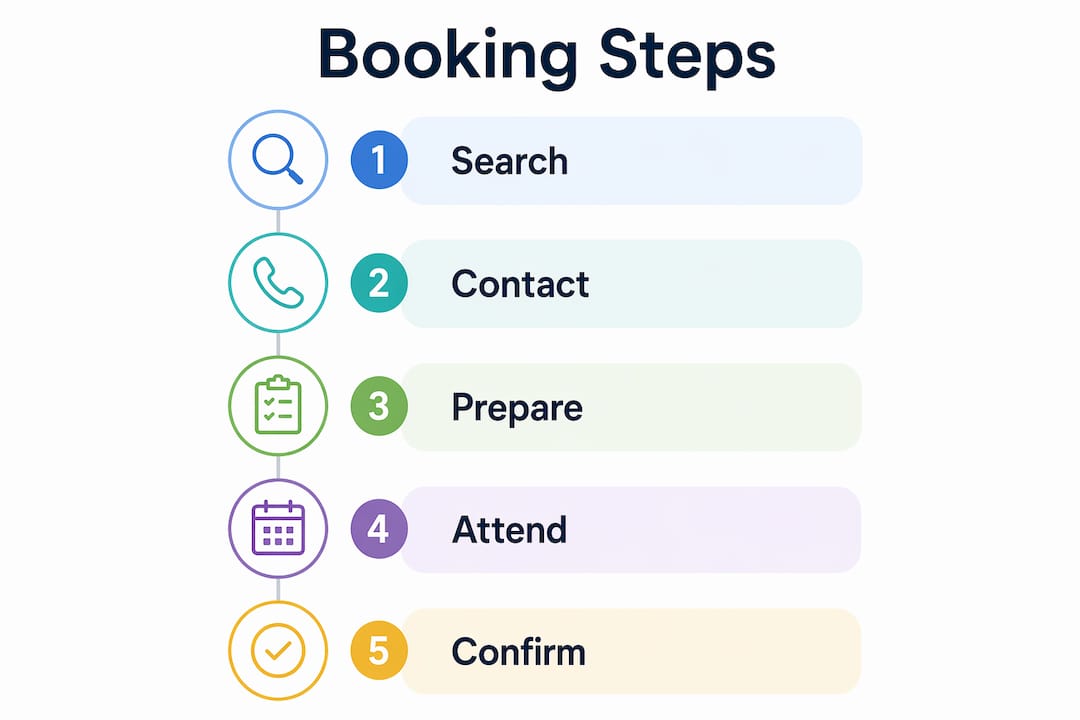
Finding a qualified notary in Ontario is faster than most people expect. The process breaks down into five clear steps.
-
Search for notaries. Use online notary directories, the Law Society of Ontario’s public registry, or a trusted platform like Theonlinenotary. Booking platforms let you filter by jurisdiction, service area, and RON availability. Verified profiles include commission status, certifications, and client reviews.
-
Vet your candidates. Ask each notary whether they are commissioned in Ontario, whether they carry errors and omissions (E&O) insurance, and what the all-inclusive fee is before you commit. Compare three to four profiles before deciding. A responsive notary answers inquiries within 30 minutes during business hours.
-
Confirm availability and service type. Check whether the notary offers in-person, mobile, or RON appointments. Confirm their availability matches your timeline. For online notary appointments in Ontario, verify the platform’s technology requirements and identity verification process.
-
Book the appointment. Schedule online or by phone. Note the cancellation policy before confirming. Standard appointments are available same-day or next-day when booked through online platforms, with fees ranging $5–$25 per act plus possible travel fees for mobile services.
-
Confirm all details. Before the appointment day, reconfirm the date, time, location, and the exact documents required. For RON, test your camera and microphone at least 30 minutes before the session starts.
| Step | Action | Key detail |
|---|---|---|
| Search | Use a directory or trusted platform | Filter by Ontario commission and RON availability |
| Vet | Check credentials and fees | Confirm E&O insurance and all-inclusive pricing |
| Confirm service type | In-person, mobile, or RON | Verify recipient acceptance first |
| Book | Online or by phone | Note cancellation policy |
| Prepare | Gather ID and unsigned documents | Test tech for RON sessions |
Pro Tip: When you find a notary near you through a directory, read the reviews specifically for punctuality and clear pricing. A notary who surprises clients with extra fees at the appointment is a notary worth skipping.
Common mistakes to avoid when booking and attending a notary appointment
Most failed notarizations trace back to a small set of avoidable errors. Knowing them in advance saves you time, money, and frustration.
“Treat your notary appointment like a court date or a medical procedure. Arrive on time, bring exactly what was requested, and do not sign anything until the notary tells you to. Some notary services enforce grace windows as short as 5–10 minutes before canceling the appointment entirely.”
The most common mistakes Ontario residents make when getting notarized:
- Signing before the appointment. Never sign a document before meeting the notary. Notarization requires witnessing the signature in real time. A pre-signed document will be refused.
- Bringing expired ID. An expired driver’s license or passport is not valid for notarization, even if it expired recently. Bring a current, undamaged government-issued photo ID.
- Skipping recipient confirmation. Booking a RON appointment without first confirming the recipient accepts it is the most expensive mistake you can make. Redo fees and delays follow.
- Misunderstanding the notary’s role. Notaries do not provide legal advice. They verify identity and witness signatures. Expecting legal guidance during the appointment leads to confusion and refusals.
- Ignoring technical requirements for RON. Technical issues can delay or invalidate an online session. Test your camera, microphone, and internet connection before the appointment. Sit in a well-lit, quiet room.
For last-minute rescheduling, contact the notary as early as possible. Most charge a cancellation fee if you cancel within a short window. Rescheduling with advance notice avoids that cost and keeps your relationship with the notary professional.
Key Takeaways
Booking a notary appointment in Ontario requires choosing the right format, preparing valid ID and unsigned documents, and vetting the notary’s credentials before you commit.
| Point | Details |
|---|---|
| Choose the right format | Confirm whether in-person, mobile, or RON suits your document and recipient requirements. |
| Prepare your ID | Bring a current, government-issued photo ID with a signature; expired IDs are rejected. |
| Never pre-sign | Sign only in the notary’s presence; pre-signed documents are refused. |
| Vet before booking | Confirm Ontario commission, E&O insurance, and all-inclusive fees from at least three notaries. |
| Confirm recipient acceptance | Verify RON acceptance with the receiving agency before scheduling an online appointment. |
What I’ve learned from watching clients get this wrong
Most people who struggle with notarization do not fail because the process is complicated. They fail because they skip one small step and assume everything will work out. I have seen clients arrive with expired passports, documents already signed, and no idea whether their embassy accepts RON. Every one of those situations was preventable.
The vetting step is where I see the most shortcuts. People find a notary through a quick search, book immediately, and never ask about credentials or pricing. Then they show up and discover the fee is double what they expected, or the notary is not commissioned for the document type they need. Comparing professional online notary services before committing takes ten minutes and saves real headaches.
Remote notarization is genuinely convenient when used correctly. The mistake is treating it as a universal substitute for in-person notarization. For affidavits, statutory declarations, and invitation letters, RON works well in Ontario. For documents destined for foreign courts or certain government agencies, in-person notarization with a physical seal remains the safer choice. Know your destination before you pick your format.
My honest recommendation: prepare your documents the day before, confirm your ID is current, and call the receiving agency directly to ask about format acceptance. That three-step check eliminates the vast majority of appointment failures I have seen.
— Ken
Theonlinenotary: certified notary booking available 24/7
Ontario residents who need a reliable, certified notary without the hassle of office hours or travel have a direct option.

Theonlinenotary offers certified notary services in Ontario around the clock, covering affidavits, statutory declarations, solemn declarations, invitation letters, and more. Every notary on the platform is commissioned in Ontario and verified for credentials before being listed. You can book a remote online notarization appointment directly through the website, complete identity verification digitally, and receive your notarized documents without leaving home. For clients who need to understand which documents qualify, the document types guide covers the full range of notarizable documents under Ontario standards.
FAQ
How long does a notary appointment take in Ontario?
Most notary appointments in Ontario take 15–30 minutes, provided you bring valid photo ID and unsigned documents. Remote online notarization sessions typically finish in under 15 minutes.
Can I get notarized online in Ontario?
Yes. Remote Online Notarization is accepted in Ontario for many document types, including affidavits and statutory declarations. Confirm with the receiving agency that they accept digitally notarized documents before booking.
What ID do I need to bring to a notary appointment?
You need a current, government-issued photo ID that includes your signature, such as a driver’s license or passport. Expired or damaged IDs are not accepted under Ontario notarization standards.
What happens if I sign my document before the appointment?
The notary will refuse to notarize a pre-signed document. Notarization legally requires the notary to witness the act of signing, so you must sign in their presence during the appointment.
How do I find a qualified notary in Ontario?
Search through the Law Society of Ontario’s public registry, a verified notary directory, or a platform like Theonlinenotary. Confirm the notary is commissioned in Ontario, carries E&O insurance, and provides an all-inclusive fee upfront before booking.