How Do You Become an Online Notary: Step-by-Step

To become an online notary in the United States, you must first hold a current traditional notary commission, then apply separately for Remote Online Notary (RON) authorization under your state’s rules. RON is not a standalone credential — it is an add-on that layers onto your existing commission.
Here is what to do right now:
- Confirm your traditional commission is active (or apply for one first)
- Check whether your state authorizes RON at your Secretary of State’s notary division page
- Identify your state’s approved RON vendor list before selecting any platform
- Budget weeks, not days — La National Notary Association estime un délai total jusqu’à six semaines, dont jusqu’à quatre semaines pour l’obtention de la commission traditionnelle.
Table of Contents
- How do you check whether your state allows RON?
- What are the exact steps to become a remote online notary?
- How do you pick a compliant RON technology platform?
- What do identity proofing and A/V recording look like in practice?
- What do RON authorization typically cost, and what are the ongoing obligations?
- What mistakes cause RON applications to be rejected?
- What if RON isn’t available for your state or document type?
- Key Takeaways
- Why RON is more than just notarizing on a video call
- Useful resources before you apply
How do you check whether your state allows RON?
Most U.S. states and the District of Columbia have enacted permanent RON laws, but the specifics differ sharply at the state line. A state that allows RON may still restrict which vendors you can use, require a separate exam, or mandate a higher surety bond.
Start at your state’s Secretary of State website and search for “remote online notary” or “RON.” The notary division page is the only source you should trust for current rules.
Key compliance items to verify on that page:
- Commission prerequisite: Most states require an active traditional commission before you can apply for RON. Tennessee’s Secretary of State is explicit: only active notaries may apply, and the online commission expires concurrently with the traditional one.
- Approved vendor list: Many states publish a list of pre-approved RON platforms. Using a non-listed vendor invalidates your notarizations.
- Training and exam: Some states require a RON-specific course and exam. Indiana, Montana, Nevada, and Ohio all require notaries to pass a RON exam.
- Bond or insurance increases: Utah requires a remote notary bond or bond rider on top of the standard commission bond. Florida requires a RON surety bond and errors-and-omissions policy, with bond and coverage amounts varying by state.
- Post-approval deadlines: New Mexico requires prompt purchase and registration of the official stamp after authorization. Missing that window can trigger an ethics referral.
Pro Tip: Check whether your RON authorization expires with your traditional commission. In Florida and Tennessee, it does — which means you must reapply for RON every time you renew your notary commission.
What are the exact steps to become a remote online notary?
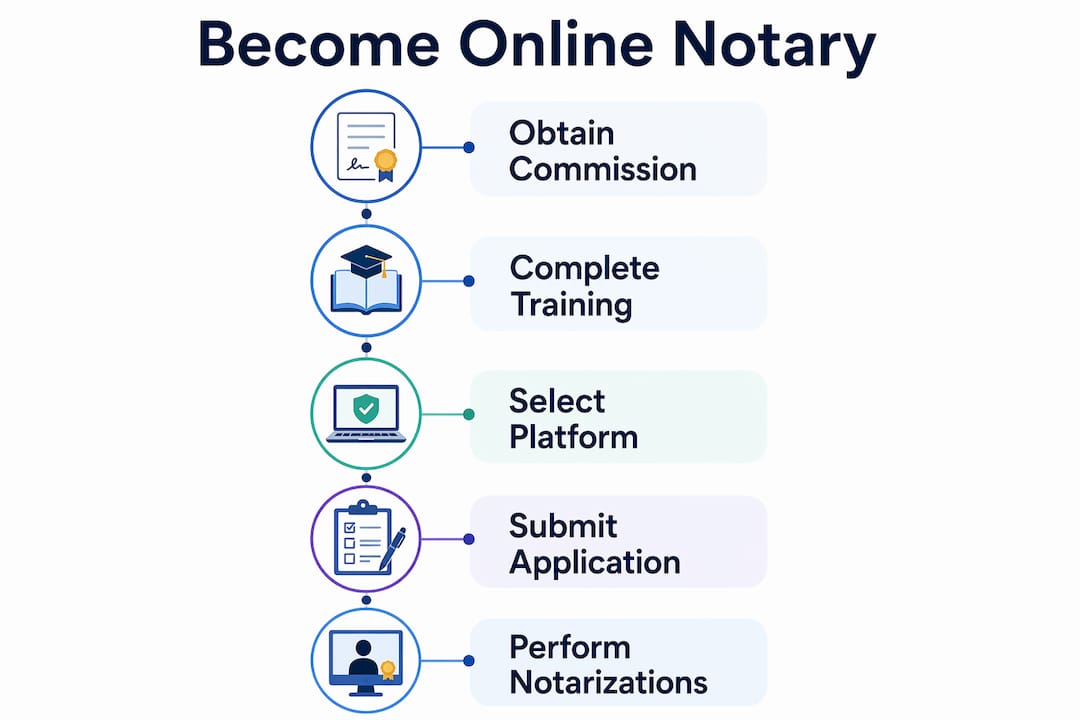
Follow these steps in order. Skipping ahead — especially trying to submit a RON application before your traditional commission is active — is the single most common reason applications are rejected.
- Confirm baseline eligibility. Most states require you to be at least 18, a legal resident of the state, and free of disqualifying felony convictions.
- Apply for or renew your traditional notary commission. Many states now accept online applications through their Secretary of State portal. This step alone can take up to four weeks.
- Complete required RON training and pass any required exam. Florida requires a two-hour approved course; other states set different hours or none at all. Attach your certificate of completion to the RON application.
- Obtain or update your surety bond and E&O insurance. Check whether your state requires a separate RON bond or a rider on your existing bond. E&O insurance is mandatory in Florida and recommended everywhere else.
- Acquire a PKI/X.509 digital certificate and electronic seal. Texas specifies that the digital certificate must come from a third-party provider, use Public Key Infrastructure (PKI) technology, be X.509-compliant, and render any later changes to the document evident.
- Contract with a state-approved RON technology vendor. Tennessee requires this contract to be in place before you apply — not after. Gather the vendor’s documentation on identity-proofing and eSeal procedures to attach to your application.
- Submit the RON application and fee. Include your vendor documentation, eSeal file, digital certificate information, training certificate, and bond proof. Florida’s initial registration fee is a nominal amount.
- Complete post-approval administrative tasks. Register your official stamp within any required window, upload updated certificate details to the state, and configure your electronic journal and recording retention settings.
Document checklist for your RON application: active commission proof, training completion certificate, bond/insurance documents, digital certificate details, vendor contract, eSeal file, and the state’s required application form.
How do you pick a compliant RON technology platform?
The platform is not just a convenience tool. Many states treat it as a regulatory component, and applications that rely on non-approved platforms are rejected outright. Treat vendor selection as a compliance decision, not a software preference.
Regulatory checklist for evaluating any RON platform:
- Approved-vendor status: Confirm the platform appears on your state’s approved list before signing any contract.
- PKI/X.509 digital certificate support: The platform must integrate with a certificate that meets your state’s tamper-evidence standard.
- Secure audio-video recording and retention: Every state requires a complete, unedited recording of each session, stored securely for the mandated retention period (commonly 5–10 years).
- Integrated electronic journal: The platform should log session details automatically, not require manual entry after the fact.
- Identity-proofing tools: Credential analysis, knowledge-based authentication (KBA), and multi-factor authentication must all be built in.
- Exportable audit data and vendor documentation: You need to be able to pull records for state audits and attach vendor instructions to your application.
Pro Tip: Ask each vendor directly whether they can supply the documentation your state requires for the application. A vendor that cannot produce that paperwork is a vendor you cannot use, regardless of how good the software is.
What do identity proofing and A/V recording look like in practice?
RON replaces the physical ID check with a layered digital process. Here is what a compliant session looks like from start to finish:
- Credential analysis: The signer uploads a government-issued ID. The platform scans security features — holograms, microprint, barcode data — to flag forgeries automatically.
- Knowledge-based authentication (KBA): The signer answers multiple-choice questions drawn from their credit and public records (prior addresses, vehicle history). This step is required by most states.
- Multi-factor authentication: A one-time code or similar second factor confirms the signer’s identity before the live session begins.
- Live audio-video session: The notary and signer appear on camera simultaneously. The notary verbally confirms identity on the recording, witnesses the electronic signature, then applies the digital certificate and eSeal.
- Session recording and retention: The platform saves the full, unedited recording. Retention periods commonly run several years depending on state regulations. The recording ties directly to the electronic journal entry, creating a tamper-evident audit trail.
Texas guidance requires that the attached digital certificate render subsequent changes to a document evident and that vendors supply instructions to authenticate seals on request. That tamper-evidence requirement is what makes a RON-notarized document legally equivalent to an in-person one.
What do RON authorization typically cost, and what are the ongoing obligations?

Costs vary by state, with total expenses generally ranging from low to moderate depending on specific requirements.
| Cost component | Example range |
|---|---|
| Traditional commission application fee | Varies by state |
| RON application fee | Florida: $10; Utah: separate fee |
| RON training course | Varies; some states: no charge |
| Digital certificate | Varies by provider |
| Electronic seal | Varies by provider |
| Surety bond / bond rider | Utah and others require a separate RON bond |
| E&O insurance | Mandatory in Florida |
| RON platform subscription | Varies by vendor |
Délais: Jusqu’à quatre semaines pour obtenir la commission traditionnelle, quelques heures pour la formation, un à deux jours pour organiser la caution et l’assurance, puis le temps de traitement restant par l’État. Prévoyez jusqu’à six semaines au total., du début à la fin.
Ongoing obligations after authorization:
- Retain audio-video recordings and electronic journal entries for the state-mandated period (commonly 5–10 years)
- Keep your digital certificate current and renew it before it expires
- Reapply for RON authorization when your traditional commission renews
- Comply with any post-approval stamp registration deadlines
What mistakes cause RON applications to be rejected?
Most rejections trace back to a handful of predictable errors.
- Applying for RON before the traditional commission is active. The sequential rule is firm in every state verified.
- Contracting with an unapproved vendor. Check the state’s approved list, not the vendor’s marketing copy.
- Missing bond or certificate specifications. A bond rider that does not meet the state’s minimum, or a digital certificate that is not X.509-compliant, will stall the application.
- Failing post-approval deadlines. Buying and registering your official stamp late can trigger discipline proceedings.
- Submitting incomplete vendor documentation. Tennessee and Florida both require vendor paperwork to accompany the application.
Best practices to stay compliant:
- Follow the sequence: commission, then RON
- Test the platform end-to-end before your first live session
- Document every step and keep copies for state audits
- Build a client checklist so signers arrive prepared
Pro Tip: Build an internal compliance checklist that maps your state’s specific rules to your platform settings, retention schedules, and renewal dates. Review it every time your commission comes up for renewal.
What if RON isn’t available for your state or document type?
Not every state has RON laws, and not every document is eligible for RON even in states that do. When RON is not an option:
- Use in-person notarization. A local commissioned notary or a service like Theonlinenotary (for Ontario-based clients needing documents notarized for cross-border use) can handle certified true copies and in-person notarizations.
- Verify document eligibility with your state regulator. Some states exclude wills, real-estate deeds, or other specific documents from RON. The state’s notary division page is the authoritative source.
- Consider hybrid approaches. Some workflows allow electronic signing followed by in-person notarization, or apostille and certified-true-copy workflows for international documents.
- Understand cross-state recognition limits. A notary physically located outside their commissioning state generally cannot perform RON for that state. A Colorado notary, for example, cannot perform a notarization while physically outside Colorado. Verify interstate recognition rules before relying on an out-of-state RON notary for documents that will be filed locally.
Ontario clients who need U.S.-bound documents notarized can explore remote notarization options that bridge the cross-border gap within the applicable legal framework.
Key Takeaways
Becoming an authorized remote online notary requires a traditional commission first, a state-approved vendor contract second, and a PKI/X.509 digital certificate that makes every notarized document tamper-evident.
| Point | Details |
|---|---|
| Commission comes first | You must hold an active traditional notary commission before applying for RON in every verified state. |
| Pick an approved vendor early | Many states require a signed vendor contract before you submit your RON application — not after. |
| Digital certificate must be PKI-compliant | Texas and other states require a third-party certificate that renders document changes evident after notarization. |
| Prévoyez jusqu’à six semaines au total. | La NNA estime un délai total jusqu’à six semaines, dont jusqu’à quatre semaines réservées à la commission traditionnelle. |
| Retain records for 5–10 years | Audio-video recordings and electronic journal entries must be stored for the state-mandated retention period. |
Why RON is more than just notarizing on a video call
Most people who ask how to become an online notary are really asking how to add a video call to their existing workflow. That framing undersells what RON actually demands.
The shift is operational, not cosmetic. Physical ID inspection is replaced by automated credential analysis, KBA, and multi-factor authentication — processes that run inside the platform, not in your head. Your digital certificate does the work your rubber stamp used to do, but with a cryptographic audit trail that a court can verify years later. That is a fundamentally different kind of accountability.
Successful RON notaries treat their vendor and tech stack as compliance infrastructure. They document every platform setting, keep vendor instructions on file for state audits, and build client checklists so signers arrive prepared. The notaries who run into trouble are the ones who treat the platform as a convenience tool and the record-keeping as optional.
At Theonlinenotary, we work with Ontario clients who need documents notarized for cross-border use every day. The U.S. RON framework described here governs American practitioners, and state regulator pages are the authoritative source for those rules. Ontario clients preparing documents for U.S. submission should review our step-by-step preparation guide to understand what a compliant remote session looks like from the client side.
Useful resources before you apply
U.S. state regulator pages:
- Florida Department of State — Remote Online Notary Public: Full application steps, approved training providers, and the $10 registration fee
- Texas Secretary of State — Getting Started as an Online Notary: PKI/X.509 certificate requirements and record-keeping obligations
- Tennessee Secretary of State — How to Become an Online Notary Public: Vendor contract requirement and concurrent commission expiration rules
- Utah Notary — RON Application Process: Bond rider requirements and separate RON application fee
- New Mexico Secretary of State — Become a Remote Online Notary: Post-approval stamp registration deadlines and ethics referral risks
- National Notary Association — How to Become a Remote Online Notary: General steps, cost ranges, and timeline estimates
For Ontario clients preparing cross-border documents:
- Theonlinenotary services page: Book a paid remote notarization or commissioner appointment for affidavits, statutory declarations, invitation letters, and more
- Online Notary tips and guides: Over 100 practical guides covering document preparation, appointment booking, and notarization workflows
This article provides general information about U.S. RON authorization processes and is not legal advice. Confirm current rules with your state’s notary regulating authority or a qualified legal professional before applying.