Essential Documents for Ontario Notary Services

TL;DR:
- Proper identification and unsigned documents are essential for successful notarization in Ontario.
- In-person signing is mandatory; documents must be signed in front of the notary or commissioner.
- Remote notarization is available for affidavits but still requires verification of identity and adherence to strict rules.
Showing up to a notary appointment without the right paperwork is one of the most frustrating experiences anyone dealing with legal documents can face. You rearrange your schedule, travel across town, and then get turned away because one item is missing. In Ontario, notary services for affidavits, statutory declarations, and solemn declarations follow strict requirements, and there is zero flexibility on most of them. This guide walks you through every document you need, the rules around identification, the critical unsigned document rule, and what to expect if you are booking a virtual appointment instead.
Table of Contents
- Checklist: Key documents you must bring for Ontario notary services
- Government-issued identification: The non-negotiable requirement
- The document to be notarized: Unsigned forms and special instructions
- Additional documents and edge cases: What might trip you up
- Remote vs. in-person notarization: How requirements change
- Why most people miss a step: The overlooked details of notary prep
- Book your notary appointment and download your free checklist
- Frequently asked questions
Key Takeaways
| Point | Details |
|---|---|
| Original ID required | You must bring a valid, government-issued photo ID—not a photocopy or expired card. |
| Do not sign before | Your affidavit or declaration must be signed in front of the notary or commissioner. |
| Have supporting papers | Bring all referenced documents, attachments, or exhibits noted in your main form. |
| Know special restrictions | Some documents (like wills or powers of attorney) cannot be commissioned by certain public offices. |
| Remote process is possible | Remote notarization is permitted for many documents, but check requirements for your specific case. |
Checklist: Key documents you must bring for Ontario notary services
Now that you understand why preparation matters, see exactly what you need to collect before your appointment. Getting organized ahead of time is not just about convenience. It is the difference between completing your legal task that day or losing hours to a rescheduled appointment.
Here is what you need to bring:
- Valid government-issued photo ID (original). Certifying legal documents confirms that accepted forms include a passport, driver’s license, Ontario Photo Card, or Permanent Resident Card, and that originals must be presented since photocopies are not accepted. No exceptions.
- The unsigned document requiring notarization. Your affidavit, statutory declaration, or solemn declaration must arrive completely unsigned. Signing it before the appointment invalidates the notarization process.
- Supporting documents referenced in your affidavit. If your affidavit or declaration references attachments, exhibits, birth certificates, or supporting letters, bring every one of those as well.
- A payment method your notary accepts. Fees vary by provider. Confirm in advance whether cash, card, or e-transfer is accepted so a small logistical gap does not derail an otherwise smooth appointment.
- Any correspondence or instructions from the requesting party. Courts, immigration authorities, or foreign institutions often specify exact formats. Bring those instructions so your notary knows exactly what the receiving body expects.
Review the full notary appointment requirements before you finalize your booking, because specific needs can vary based on the type of document and where it will be used.
Pro Tip: Originals only. Even if a photocopy looks pristine, it will not be accepted for identity verification. Bring the physical original government-issued ID every single time.
Government-issued identification: The non-negotiable requirement
Top of the list, and you cannot get notarized without proper identification. Let’s clarify what’s accepted and what will immediately get your appointment canceled.
The rules around identification are about more than bureaucratic formality. A notary’s job is to verify that the person signing a legal document is exactly who they claim to be. That verification depends entirely on reliable, government-issued photo ID. If the notary cannot confirm your identity beyond reasonable doubt, they cannot legally complete the notarization.
Accepted forms of ID include:
- Canadian passport (valid or expired within 5 years in some cases, though valid is always preferred)
- Ontario driver’s license
- Ontario Photo Card
- Permanent Resident Card
- Federal or provincial government employee ID card
- Military ID card
What is typically not accepted:
| Accepted | Not Accepted |
|---|---|
| Canadian passport | Student ID cards |
| Ontario driver’s license | Health cards (Ontario) |
| Ontario Photo Card | Library cards |
| Permanent Resident Card | Employer-issued badges |
| Military ID | Photocopies of any ID |
| Federal government employee ID | Expired ID (beyond acceptable window) |
Notice that Ontario health cards are missing from the accepted list. Many people assume a health card is government-issued and therefore valid. It is government-issued, but Ontario’s health card does not include a photograph that meets the required standard for notarization identity verification, making it unacceptable in most contexts.
As outlined in the City of Toronto’s certifying legal documents guidelines, valid government-issued photo ID is required to verify identity, and originals must be presented since photocopies are not accepted. That language is unambiguous.
“Originals must be presented; photocopies not accepted.”
If you arrive with a photocopy, even a certified one, your appointment will be denied. You will need to reschedule after retrieving your original documents. This costs you time, and in some cases where deadlines are involved, it can have legal consequences.
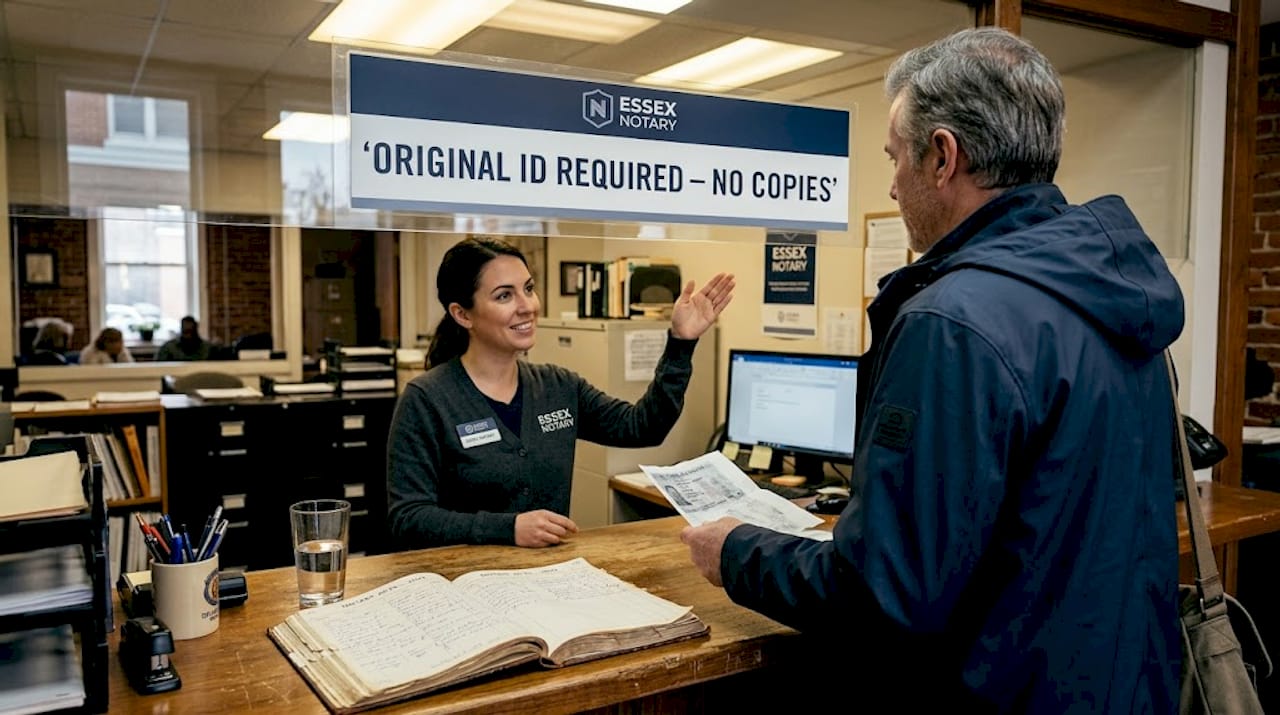
For a thorough breakdown of every acceptable form of identification needed for notary appointments in Ontario, including what to do if you do not have a standard ID, review the dedicated guide.
The document to be notarized: Unsigned forms and special instructions
With your ID in hand, you also need the to-be-notarized document, but handling it properly is crucial. The most common mistake people make is not forgetting a document. It is signing the document before they arrive.
The Law Society of Ontario is clear on this: do not sign before the appointment. Signing must occur in the presence of the commissioner or notary. The official verifies that you understand the content, administers the oath or affirmation, and then completes the jurat (the formal certification at the bottom of the document). If you sign it beforehand, that sworn element is void.
Here is what typically happens at your appointment, step by step:
- You present your original government-issued photo ID to the notary or commissioner.
- The notary reviews the unsigned document and confirms it is complete and correctly formatted.
- The notary asks whether you understand the content and confirm it is true.
- You swear an oath or affirm the truthfulness of the document.
- You sign the document in front of the notary.
- The notary signs and seals the document, completing the jurat.
- You receive the notarized copy for submission.
Common forms that go through this process include:
- Affidavits of support for immigration or court proceedings
- Statutory declarations for name changes, marital status, or employment
- Solemn declarations for government or institutional submissions
- Invitation letters for visitor visas
- Affidavits of residence or identity
Pro Tip: Bring all referenced attachments or exhibits. If your affidavit says “see Exhibit A,” that exhibit must be physically present at the appointment. The notary attaches and stamps each exhibit as part of the official record. Missing an exhibit means the notarization is incomplete.
Explore the range of different affidavit types to make sure you are arriving with the right format for your specific situation.
Additional documents and edge cases: What might trip you up
Not every situation is straightforward. Here are edge cases and extra items that catch even well-prepared people off guard.
Beyond your ID and unsigned document, certain situations demand more. If your affidavit references a supporting letter from a third party, that letter should be present. If it references a birth certificate, bring the original. If the document is a translation from another language, bring both the original foreign language document and the certified English translation.
Common supporting documents to consider:
- Birth certificates (original, not certified copies in most cases)
- Marriage certificates or divorce decrees
- Prior court orders or legal rulings referenced in the affidavit
- Certified translations with the translator’s credentials
- Photographs if referenced as exhibits in the declaration
- Correspondence from immigration authorities or courts outlining format requirements
One critical restriction most people do not anticipate: not all notary providers can handle all document types. The City of Toronto commissioners will not commission powers of attorney, real estate documents, wills, or estate-related documents. This restriction exists because those document categories require specialized knowledge and carry legal weight that goes beyond what a general commissioning service covers.
This is also where the distinction between a notary public and a commissioner for oaths becomes important. A commissioner for oaths can administer oaths and witness declarations, but only for use within Canada. A notary public has broader authority, including certifying copies of documents, completing apostille-ready documents for international use, and handling matters that cross jurisdictions. If you are unsure which one you need, check the guide to documents requiring notarization to clarify before booking.
Pre-appointment checklist to minimize rejected trips:
- Confirmed the provider handles your specific document type
- Verified the document is unsigned and formatted correctly
- Assembled all exhibits and attachments referenced in the document
- Checked whether a translation is needed and whether it is certified
- Called ahead if the document involves real estate, a will, or a power of attorney
Remote vs. in-person notarization: How requirements change
If you want to avoid travel, remote notarization may be possible. Here is what changes when you go virtual instead of in person.
Ontario’s regulatory framework was updated under O. Reg. 431/20, which permits remote commissioning of affidavits and statutory declarations via audio-visual technology, provided specific conditions are met. Those conditions include real-time audio-visual presence, proper ID verification on screen, and a technically reliable connection throughout the session.
What changes in a remote appointment:
| Requirement | In-person | Remote |
|---|---|---|
| Government-issued photo ID | Original, physically shown | Held clearly to camera, verified visually |
| Document signing | In front of notary, pen and paper | Digital signature platform or wet signature by mail |
| Technology needed | None | Reliable internet, webcam, and mic |
| Document submission | Hand-delivered | Uploaded or emailed in advance |
| Availability | Limited by location and hours | Broader availability, often faster booking |
| Suitable for | All document types | Affidavits, declarations; some restrictions apply |
Remote notarization does not mean a reduced standard of verification. The notary still needs to see your ID clearly, confirm your identity, witness your signature in real time, and administer your oath. The process mirrors in-person requirements, just adapted for audio-visual technology.
Tips for preparing for a virtual appointment:
- Test your camera and microphone at least 24 hours before your appointment.
- Find a quiet, well-lit location where your face and ID are clearly visible.
- Upload your document to the platform in advance (your provider will specify how).
- Have your original ID ready to hold up to the camera during verification.
- Know your document well, because the notary will ask if you understand and attest to its contents.
Physical presence is still preferred or required for certain complex or high-stakes documents. If your document will be used internationally or involves specialized areas like real estate, confirm with your provider whether remote is appropriate. Explore the online statutory declaration process for a step-by-step breakdown of how virtual appointments work in practice.
Why most people miss a step: The overlooked details of notary prep
Having covered all the required documents and possible pitfalls, here is an expert look at common missteps even diligent people make.
The most frequent rejection cause is not ignorance. It is assumption. People assume their document is fine because they filled it out carefully. They assume their ID is fine because they use it regularly. They assume the notary they booked handles their document type. These are reasonable assumptions that are often wrong.
Signing an affidavit before the appointment is the single biggest avoidable mistake we see. It happens because people want to be “ready.” They do not realize that a pre-signed affidavit cannot be notarized, period. You will start over.
Subtle ID issues also derail appointments constantly. A student ID looks official. A health card has your name and photo on it. But neither meets the legal standard for notary identity verification. Expired ID creates gray areas that most notaries resolve by refusing the appointment rather than taking on legal risk.
The confusion between notaries and commissioners trips up businesses especially. Companies sending employees for document work sometimes book a commissioner when they need a notary, particularly for documents destined for foreign governments or institutions. Understanding who can notarize documents in Ontario and what their authority covers is not optional if your document has specific legal or international requirements.
Our strongest advice: always call or email your provider before the appointment. Ask directly whether they handle your document type, what ID they accept, and whether any supporting documents are needed. Two minutes of confirmation saves a wasted trip.
Book your notary appointment and download your free checklist
Ready to get notarized? Take the next step with these helpful resources.
At The Online Notary, we make it straightforward to get your affidavit, statutory declaration, invitation letter, or solemn declaration notarized without unnecessary stress. Our online notary services are designed for Ontario residents and businesses who want fast, reliable notarization without rearranging their entire day.

Before you book, review the notary ID requirements to confirm what to bring, and check the full public notary requirements page for document-specific guidance. A quick review of these resources before your appointment dramatically reduces the chance of delays. Book your appointment today and arrive confident you have everything you need.
Frequently asked questions
What is the most common reason people are turned away from a notary appointment in Ontario?
Bringing the wrong or missing type of government-issued photo ID is the top reason, since originals must be presented and photocopies of any kind are not accepted.
Can I sign my affidavit or declaration before I see the notary?
No, you must wait to sign in front of the notary or commissioner, because signing must occur in the presence of the official who then administers the oath and completes the jurat.
Can all documents be notarized remotely in Ontario?
Remote commissioning is allowed for affidavits and statutory declarations under O. Reg. 431/20, but some documents and situations still require an in-person appointment.
What’s the difference between a notary and a commissioner in Ontario?
Notaries have broader powers including certifying copies and handling international documents, while commissioners handle domestic oaths and declarations only; the Law Society clarifies that you should use a notary when the document is destined for foreign use.
Are there documents city notary offices won’t commission?
Yes, Toronto city staff will not commission powers of attorney, wills, real estate documents, or estate-related paperwork, so check your provider’s specific restrictions before booking.