eNotary in Ontario: Your Complete 2026 Guide

TL;DR:
- Electronic notarization uses digital signatures and cryptographic seals to produce legally valid documents remotely. It offers faster, more secure verification than traditional in-person notarizations, with sessions averaging eight minutes. Proper platform choice and thorough preparation ensure compliance and reduce delays for Ontario residents.
An eNotary is a commissioned notary public who performs notarizations using electronic tools, digital signatures, and cryptographic seals, producing legally valid documents without requiring physical presence. For individuals and businesses in Ontario, this means affidavits, statutory declarations, solemn declarations, and invitation letters can all be notarized from any location with an internet connection. The technology behind electronic notarization is more secure than a traditional paper stamp. The legal framework supporting it continues to expand across Canadian provinces and internationally.
What is an eNotary and how does it differ from traditional notarization?
An eNotary performs the same legal function as a traditional notary public. The core difference is the medium. Instead of meeting in person, signing paper documents, and applying a physical stamp, an eNotary uses digital signatures, electronic seals, and live video sessions to authenticate documents.
There are two distinct types of electronic notarization. The first is electronic notarization, where a notary and signer meet in person but use digital tools to sign and seal the document. The second is remote online notarization, where the entire session happens over a live audio-video call. Understanding this distinction matters because some documents still require in-person presence even when electronic tools are used.
Remote online notarization is legally recognized as equivalent to traditional notarization in over 44 U.S. states and many international applications. That legal equivalency is the foundation that makes electronic notarization practical for cross-border business and legal documents.
How does the eNotary process work in Ontario?
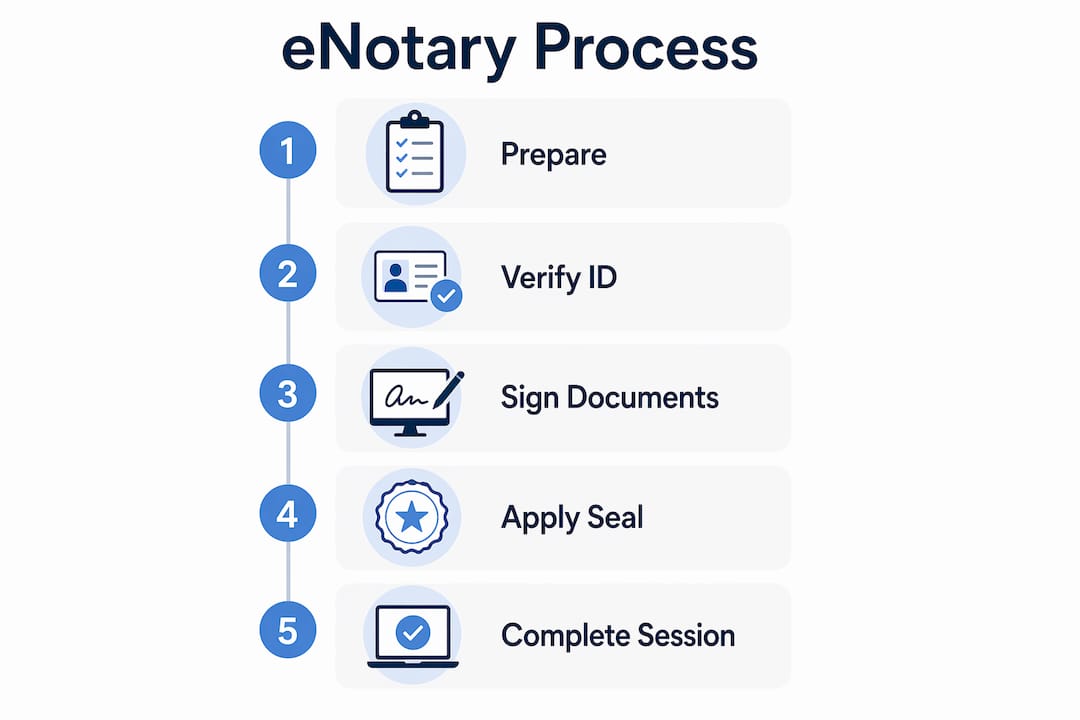
The remote notarization process follows a clear sequence. Each step is designed to verify identity, protect document integrity, and create a legally defensible record.
- Upload your document. You submit the document to the platform before the session. The notary reviews it to confirm it is eligible for electronic notarization.
- Verify your identity. The platform uses government-issued photo ID and Knowledge-Based Authentication (KBA). KBA typically involves answering personal questions drawn from credit or public records. Non-residents or individuals with limited credit history may need alternative identity proofing methods.
- Join the live session. You connect with a commissioned notary over a secure audio-video call. The notary confirms your identity, witnesses your electronic signature, and applies a digital seal in real time.
- Receive the notarized document. The platform delivers a tamper-evident digital file. Any alteration after the seal is applied automatically invalidates the document.
- Access the audit trail. The session is recorded, and the notary logs the transaction in an electronic journal.
The average notarization session takes about 8 minutes, ranging from 5 to 14 minutes depending on document complexity and how smoothly identity verification goes. That speed is one of the clearest advantages over scheduling an in-person appointment.
Pro Tip: Have your government-issued ID ready and clearly lit before the session starts. Poor lighting or a blurry ID scan is the most common cause of KBA delays.

What documents can be notarized electronically in Ontario?
Electronic notarization covers a wide range of document types. The types of documents eligible for online notarization in Ontario include:
- Affidavits, including affidavits for proof of relationship and financial affidavits
- Statutory declarations and solemn declarations
- Invitation letters for visa applications
- Powers of attorney for property and personal care, in many cases
- Business agreements, contracts, and certified true copies
- Consent letters for minors traveling internationally
Certain document types such as wills and some court filings may be excluded or require wet-ink signatures even in jurisdictions that permit electronic notarization. That exclusion exists because those documents carry heightened legal consequences and some courts have not yet updated their acceptance rules.
Ontario residents should verify document eligibility with their notary before booking a session. Acceptability can also depend on the receiving institution. A foreign embassy, for example, may have its own requirements about how a notarized document must be presented.
What is the legal and security framework behind eNotary services?
The legal validity of electronic notarization rests on two pillars: legislation and cryptographic technology. Both work together to make digitally notarized documents trustworthy.
On the technology side, eNotary services use Public Key Infrastructure (PKI) and digital certificates to create tamper-evident notarized documents. PKI makes digital notarization more secure than traditional paper methods because any unauthorized change after signing is detectable. The digital notary seal uses an X.509 digital certificate with cryptographic keys, meaning any post-notarization alteration automatically invalidates the document. That level of integrity is not achievable with a physical rubber stamp.
On the compliance side, notaries performing eNotarizations must complete specialized training, pass an exam, use approved digital certificates, and maintain electronic journals and recordings. These requirements protect both the signer and the receiving institution.
“Trusted digital notarization platforms significantly reduce fraud risk through cryptographic security, surpassing traditional paper methods in document integrity.” The combination of PKI, X.509 certificates, and recorded sessions creates an audit trail that paper notarization simply cannot match.
Online notarization platforms provide a full audit trail including video recordings of the session, digital seals, and an electronic journal retained for at least ten years. That retention period matters for legal disputes or document challenges that arise years after the original notarization.
| Security Feature | What It Does |
|---|---|
| PKI and digital certificates | Binds the notary’s identity to the document cryptographically |
| X.509 tamper-evident seal | Invalidates the document if altered after signing |
| Live audio-video session | Confirms signer identity and creates a verifiable record |
| Electronic journal | Logs every transaction for long-term compliance |
| Video recording retention | Provides evidence of proper procedure for at least 10 years |
For Ontario users, digital notary security and legal compliance are governed by provincial electronic commerce legislation alongside the notary’s professional obligations. The framework is designed to give digitally notarized documents the same standing as their paper counterparts.
What do eNotary services cost and how should you choose a platform?
Electronic notarization fees vary by platform, document type, and session complexity. Online notarization fees typically start at $25 per notarized seal, with additional charges of $10 to $15 for extra signers or witnesses. That base fee is competitive with in-person notarization when you factor in travel time and scheduling costs.
Fee structures generally fall into two categories:
| Fee Model | Best For |
|---|---|
| Pay-per-use | Individuals or businesses with occasional notarization needs |
| Subscription or bundled | Organizations with high-volume or recurring document requirements |
Beyond price, platform selection should prioritize reliability and document compatibility. Platforms offering 24/7 availability and live support charge higher fees but deliver reliability that is critical for time-sensitive or complex notarizations. A failed session caused by a platform outage or incompatible document format can delay a visa application, a real estate closing, or a court deadline.
For Ontario users dealing with international documents, confirm that the platform’s digital seal is accepted by the receiving country or institution. Some foreign authorities require additional authentication steps, such as an apostille, even after electronic notarization.
Pro Tip: Ask the platform directly whether their digital seal format is accepted by your specific receiving institution before you pay. This one question prevents the most common and costly mistakes.
For a detailed breakdown of eNotary pricing and platform features, compare options based on document type support, identity verification methods, and audit trail standards rather than price alone.
How to prepare for your eNotary session in Ontario
Preparation determines whether your session takes 5 minutes or 14. The following steps reduce friction and protect your document from being rejected.
- Gather two forms of ID. A government-issued photo ID is required. A second piece of ID strengthens your identity verification and reduces the chance of KBA failure.
- Test your device and connection. Use a computer or tablet with a working camera and microphone. A stable internet connection prevents session drops during the live video call.
- Prepare your document in advance. Upload the document before the session and confirm it is complete. Incomplete documents cannot be notarized and will require rescheduling.
- Understand witness rules. Some documents require a witness in addition to the notary. Confirm whether your document needs a witness and whether that witness must be present during the video session.
- Save and back up the notarized file. Store the completed document in a secure location, such as encrypted cloud storage. Keep a copy separate from the original in case of technical failure.
- Verify the notarized document after receipt. Most platforms provide a verification link or QR code embedded in the document. Use it to confirm the seal is intact before submitting the document to any institution.
Preparing thoroughly for your online notary session is the single most effective way to avoid delays. Identity verification is the most common friction point, and it is entirely preventable with the right documents in hand.
Key Takeaways
Electronic notarization in Ontario is legally valid, cryptographically secure, and faster than traditional in-person notarization when you prepare correctly and choose a reliable platform.
| Point | Details |
|---|---|
| Legal equivalency | Electronic notarization carries the same legal weight as traditional notarization in recognized jurisdictions. |
| Session speed | The average session takes 8 minutes, but identity verification delays can extend it to 14 minutes. |
| Document eligibility | Affidavits, statutory declarations, and powers of attorney are eligible; wills and some court filings may not be. |
| Security technology | PKI and X.509 certificates make digital seals more tamper-resistant than physical stamps. |
| Platform selection | Prioritize reliability, 24/7 support, and document compatibility over the lowest fee. |
Why I think Ontario residents underestimate eNotary security
Most people assume electronic notarization is a convenience trade-off. They expect it to be faster but less secure. That assumption is wrong, and it leads people to pay for in-person notarization when a digital session would actually protect their document better.
The cryptographic seal applied during an eNotary session is not replicable with a rubber stamp and ink. A physical notary stamp can be forged. An X.509 digital certificate tied to a specific notary’s credentials cannot be duplicated without detection. The audit trail, including the video recording and the electronic journal retained for at least ten years, creates a level of accountability that paper records rarely achieve.
Where I see Ontario users make mistakes is in platform selection. They choose the cheapest option without checking whether the platform’s seal format is accepted by the institution receiving the document. That error costs more in time and fees than the savings on the original session. The advantages of digital notary services are real, but only when the platform is matched to the document’s destination.
The legal framework in Ontario and across Canada continues to mature. Businesses that build electronic notarization into their document workflows now will have a clear operational advantage as acceptance expands. The technology is ready. The legal foundation is in place. The remaining barrier is simply awareness.
— Ken
Theonlinenotary: trusted eNotary services for Ontario
Theonlinenotary provides online notary services in Ontario around the clock, with commissioned notaries available 24/7 for affidavits, statutory declarations, solemn declarations, invitation letters, and more.

Every session uses PKI-secured digital seals and live audio-video verification, meeting Ontario’s legal requirements for electronic notarization. Whether you need a single affidavit notarized or ongoing support for business documents, Theonlinenotary offers a legally compliant, secure process without the scheduling delays of in-person appointments. Visit the services page to book your session and get your documents notarized today.
FAQ
What is an eNotary?
An eNotary is a commissioned notary public authorized to perform notarizations using electronic tools, digital signatures, and cryptographic seals. The resulting documents carry the same legal weight as traditionally notarized paper documents.
How long does an eNotary session take in Ontario?
The average session takes about 8 minutes, with a range of 5 to 14 minutes depending on identity verification and document complexity.
Are electronically notarized documents accepted in Ontario courts?
Acceptance depends on the document type and the specific court or institution. Wills and certain court filings may still require wet-ink signatures, so confirm eligibility with your notary before booking.
What ID do I need for an eNotary session?
A government-issued photo ID is required for all sessions. A second piece of ID is recommended to reduce the risk of Knowledge-Based Authentication delays, particularly for non-residents.
Is electronic notarization more secure than in-person notarization?
Electronic notarization using PKI and X.509 digital certificates is more tamper-resistant than a physical stamp. Any alteration to the document after the digital seal is applied automatically invalidates it, which is not possible to detect with a paper notarization.