CCDC 9B Statutory Declaration: Ontario Guide
TL;DR:
- The CCDC 9B statutory declaration certifies full payment for subcontractors before progress payments. Proper completion and notarization prevent delays, rejection, or legal issues in Ontario construction projects. Following strict procedures ensures accurate legal certification and safeguards subcontractors’ right to payment.
CCDC 9B is the statutory declaration subcontractors use to certify full payment of all labor, materials, sub-subcontracts, and services tied to a specific progress payment in Canadian construction projects. This form is a legal requirement in many construction contracts across Ontario, and submitting it incorrectly can freeze your payment. The purpose of this declaration goes beyond paperwork. It protects every party in the payment chain by confirming that all accounts are settled before the next payment releases. Understanding how ccd9b works, how it differs from related forms, and how to notarize it correctly is the fastest way to avoid costly delays.
What is ccd9b and when is it required?
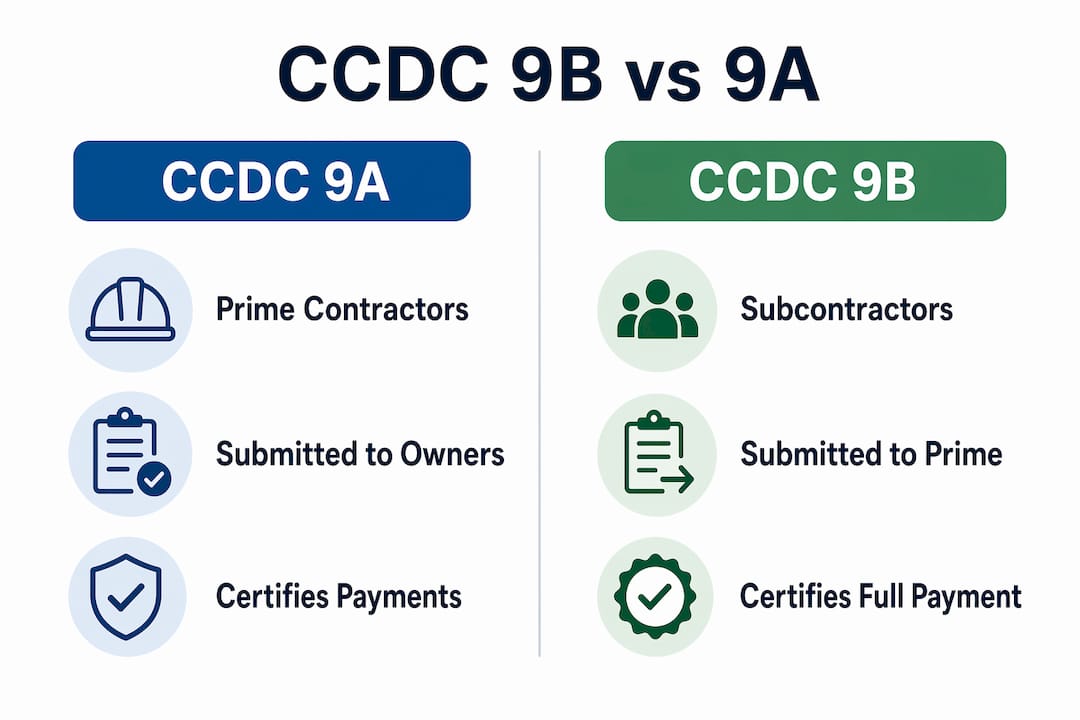
CCDC 9B is the statutory declaration subcontractors use to certify full payment related to specific progress payments, contrasting with CCDC 9A, which prime contractors use with owners. The form applies specifically to subcontractors holding contracts with prime contractors. It confirms that all labor, sub-subcontracts, products, and services have been paid as of the declaration date.
Construction contracts in Ontario frequently require this form before a prime contractor will release a progress payment or holdback to a subcontractor. The logic is straightforward. The prime contractor needs written, sworn confirmation that the subcontractor has paid everyone below them in the payment chain. Without that confirmation, the prime contractor carries financial and legal risk.
The Canadian Construction Association updates CCDC documents regularly to reflect current construction industry standards and legal requirements. That means the version of the form you use matters. An outdated form can be rejected outright, even if every other detail is correct.
When does a contract trigger the ccd9b requirement?
The requirement appears in the contract itself. Most standard CCDC contracts specify that a subcontractor must submit a properly notarized CCDC 9B before each progress payment or holdback release. The timing is not optional. Missing the submission window delays payment and can create disputes about whether work was completed and paid for.
- The form must cover all labor costs paid to workers on the project.
- It must confirm payment of all sub-subcontractors engaged by the subcontractor.
- It must certify that all materials and products incorporated into the work have been paid.
- It must cover any services rendered in connection with the specific progress payment period.
Pro Tip: Read your contract carefully before the first payment application. Identify whether CCDC 9B is required and note the submission deadline. Waiting until payment is due to locate and prepare the form is the most common cause of avoidable delays.
How to correctly complete and notarize the CCDC 9B form in Ontario
Completing the form correctly is not complicated, but the rules are strict. One missed field or a signature applied at the wrong moment can invalidate the entire document. Follow these steps to get it right the first time.
-
Obtain the correct version. Use the current edition of the CCDC 9B form. The 2018 CCDC copyright seal is mandatory on the form for it to be accepted. Payment administrators and commissioners require a physical 2018 copyright seal matching the form version. A version mismatch or missing seal results in immediate rejection.
-
Complete every field. Fill in all required fields without leaving any blanks. Do not alter the pre-printed text. The form is a standard legal document, and any unauthorized changes make it invalid.
-
Use the right software. Adobe Reader cannot save data entered into PDF forms. Use Adobe Acrobat or print the form and complete it by hand. Losing your entered data and starting over is a frustrating and avoidable problem.
-
Confirm the authorized signatory. The declaration must be signed by an authorized officer of the company, such as the President, Vice President, or Secretary. Regular employees cannot sign on behalf of the company. Commissioners will refuse to process forms signed by unauthorized individuals.
-
Do not pre-sign the form. This is the single most important rule. The declarant must sign the form in front of the commissioner or notary. Pre-signing invalidates the document and causes project delays. The law requires the notary to witness the actual act of signing.
-
Attend the notarization appointment. Bring the unsigned form, valid government-issued photo ID, and the 2018 CCDC copyright seal. The notary will confirm your identity, watch you sign, and then commission the declaration.
-
Submit promptly. Deliver the completed, notarized form to the prime contractor before the payment deadline specified in your contract.
Pro Tip: If you are completing the form digitally, print a test copy first to confirm all fields display correctly before printing the final version for signing. Small formatting errors are much easier to catch before the notarization appointment.
Learning how to complete a statutory declaration online in Ontario can save significant time, especially for subcontractors managing multiple payment applications across different projects.

What are the differences between CCDC 9B and CCDC 9A?
Selecting the wrong form is a common and costly error. The deciding factor is your contractual position, not the type of work you perform. Subcontractors with contracts held directly with prime contractors use CCDC 9B. Prime contractors with contracts held directly with owners use CCDC 9A.
The confusion arises because both forms look similar and serve the same general purpose. Both certify that payments have been made. The difference is in who is making the declaration and to whom.
| Feature | CCDC 9A | CCDC 9B |
|---|---|---|
| Used by | Prime contractors | Subcontractors |
| Submitted to | Project owner | Prime contractor |
| Certifies payment of | Sub-subcontractors, labor, materials | Sub-subcontracts, labor, products, services |
| Applies to | Prime contract progress payments | Subcontract progress payments |
| Common error | Used by subcontractors by mistake | Used by prime contractors by mistake |
Submitting the wrong form does not just delay payment. It can create a legal gap in the payment certification chain. If a prime contractor submits a CCDC 9A to the owner but a subcontractor never submits a valid CCDC 9B, the prime contractor may face liability for unverified payments downstream.
The distinction between CCDC 9A and 9B is often misunderstood. Clarifying your contractual position before selecting a form is the single most effective way to avoid administrative errors. When in doubt, review your subcontract agreement and confirm your role in the payment chain.
Common challenges and best practices for CCDC 9B submission in Ontario
Ontario subcontractors face a predictable set of problems when submitting this form. Most of them are avoidable with preparation.
Document rejection due to improper signatures is the leading cause of payment delays. The notary must witness the signing. Arriving at a notarization appointment with a signed form means starting over. Build extra time into your schedule before payment deadlines to allow for a second appointment if needed.
Missing or incorrect seals cause immediate rejection. The 2018 copyright seal must match the form version. Keep a supply of current seals on hand if your company submits these declarations regularly.
Unauthorized signatories create problems that are harder to fix. If the person who signed the form is not a listed officer of the company, the declaration is invalid. Review who signs statutory declarations in Ontario before your first submission to confirm the right person is available.
- Maintain organized payment records for each progress payment period, including invoices, payroll records, and sub-subcontractor payment confirmations.
- Keep copies of every submitted CCDC 9B with the notary’s stamp and the date of submission.
- Track submission deadlines in your project management system alongside payment application dates.
- Consult a construction lawyer for complex projects or when contract terms are unclear.
Statutory declaration requirements vary by province and contract terms, and Ontario may have specific nuances that require professional legal advice. For straightforward submissions, a qualified notary is sufficient. For disputes or unusual contract structures, a construction lawyer adds an important layer of protection.
Industry associations emphasize that properly notarized declarations with official seals are non-negotiable for upholding project payment integrity. This is not a formality. It is a legal certification with real financial consequences if done incorrectly.
Key Takeaways
Correct completion and timely notarization of the CCDC 9B statutory declaration is the most direct way for Ontario subcontractors to protect their right to payment on construction projects.
| Point | Details |
|---|---|
| Form identity matters | CCDC 9B is for subcontractors only; prime contractors use CCDC 9A instead. |
| Seal version is mandatory | The 2018 CCDC copyright seal must match the form version or the document is rejected. |
| Never pre-sign | The notary must witness the signing; pre-signing invalidates the declaration entirely. |
| Authorized officer required | Only a President, VP, or Secretary can sign; regular employees cannot substitute. |
| Organize payment records | Keep invoices, payroll records, and sub-subcontractor confirmations ready before each submission. |
Why I take CCDC 9B errors more seriously than most people expect
After working with subcontractors across Ontario on statutory declarations, the pattern I see most often is not ignorance. It is overconfidence. People who have submitted these forms before assume the process is routine, and that assumption is where mistakes happen.
The pre-signing problem is the clearest example. I have seen experienced project managers arrive at notarization appointments with fully signed forms, certain they were saving time. The notary cannot commission a document that was signed outside their presence. That is not a technicality. It is a legal requirement that exists to prevent fraud. The result is a missed payment deadline and a rescheduled appointment.
The seal issue surprises people even more. The 2018 CCDC copyright seal is a physical requirement, not a digital checkbox. If your company has been using an older version of the form with an older seal, every one of those submissions was at risk of rejection. Using current, verified editions is not optional. The Canadian Construction Association reviews and updates these documents for a reason.
My recommendation for any subcontractor submitting CCDC 9B regularly is to build a simple checklist into your payment application process. Confirm the form version, confirm the seal, confirm the signatory, and book the notarization appointment before the form is signed. That sequence, done consistently, eliminates the most common rejection reasons. For complex contracts or disputes, consult a construction lawyer. For standard submissions, a qualified notary who understands statutory declarations is all you need.
— Ken
Notarizing your CCDC 9B with Theonlinenotary
Subcontractors in Ontario who need fast, reliable notarization for statutory declarations have a direct option.

Theonlinenotary provides online notary services for statutory declarations, affidavits, solemn declarations, and related legal documents across Ontario, available 24/7. The process is designed for people who cannot afford to miss a payment deadline because of scheduling conflicts with a traditional notary office. Qualified commissioners guide you through the signing process correctly, so your CCDC 9B meets every legal requirement the first time. For subcontractors managing multiple payment applications, that reliability is not a convenience. It is a financial safeguard.
FAQ
What is CCDC 9B used for?
CCDC 9B is a statutory declaration subcontractors submit to certify full payment of labor, materials, sub-subcontracts, and services for a specific progress payment. It is required by most standard construction contracts before a prime contractor releases payment.
What is the difference between CCDC 9A and CCDC 9B?
CCDC 9A is used by prime contractors to certify payments to the project owner. CCDC 9B is used by subcontractors to certify payments to the prime contractor. Submitting the wrong form invalidates the declaration.
Can I sign the CCDC 9B before the notary appointment?
No. The declarant must sign the form in front of the commissioner or notary. Signing beforehand invalidates the document and requires the entire process to restart.
Who is authorized to sign the CCDC 9B?
Only a legally authorized company officer, such as the President, Vice President, or Secretary, can sign the declaration. Regular employees are not authorized, and commissioners will refuse to process forms signed by unauthorized individuals.
Does the 2018 CCDC copyright seal matter?
Yes. The 2018 copyright seal is a mandatory requirement. A missing seal or a version mismatch between the seal and the form results in immediate rejection by payment administrators.
Recommended
- Statutory Declaration in Court: Complete Ontario Guide - The Online Notary
- Complete Guide to Statutory Declaration Samples Canada - The Online Notary
- How to Complete a Statutory Declaration Online in Ontario - The Online Notary
- Understanding Who Signs Statutory Declarations in Ontario - The Online Notary