Canadian Notary Online Workflow: Ontario’s 2026 Guide

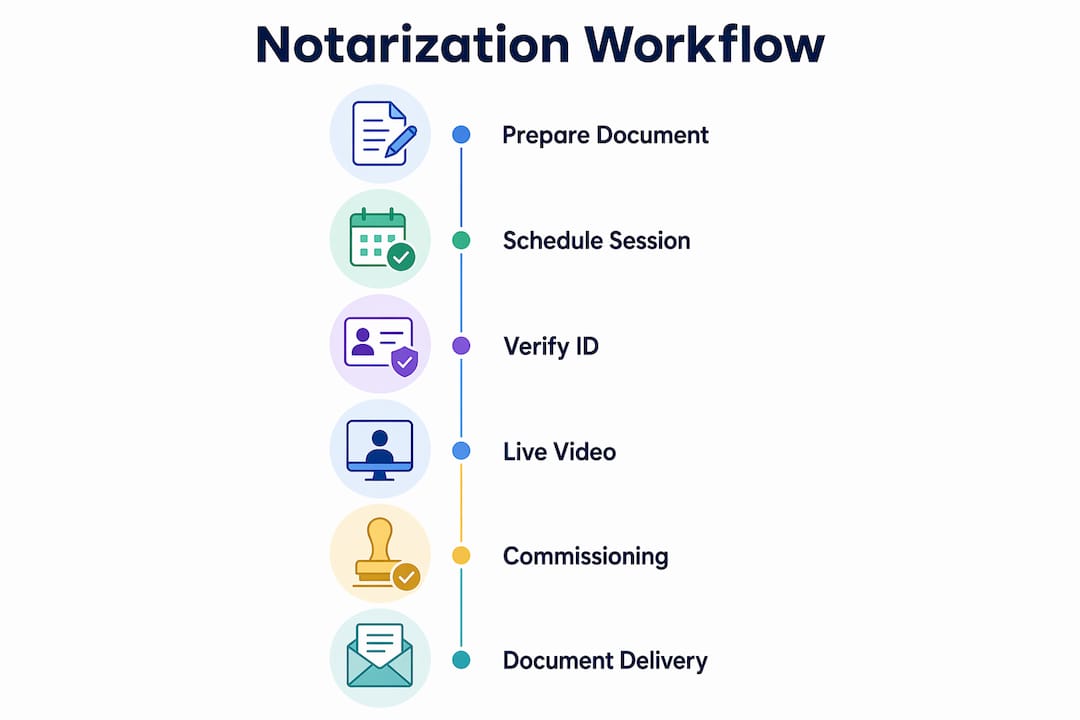
A Canadian online notary is a licensed professional who notarizes legal documents remotely through secure, real-time video communication. In Ontario, this process is governed by O. Reg. 431/20, which sets out the exact conditions under which remote commissioning is legally valid. The core Canadian notary online workflow runs through six stages: booking, document preparation, identity verification, live video session, signing with a modified jurat, and secure delivery.
Documents commonly eligible for online notarization in Ontario include:
- Affidavits (general, financial, and immigration-related)
- Statutory declarations and solemn declarations
- Invitation letters for visa applications
- Powers of attorney when properly commissioned remotely
- Certified true copies (in-person only for certain document types)
Not every document qualifies. Certified true copies of original documents, for example, often still require in-person attendance. Always confirm eligibility before booking.
Table of Contents
- What are the legal and technical requirements for online notarization in Ontario?
- How does the step-by-step online notarization process work in Ontario?
- Why do Ontario residents choose online notary services?
- How do you verify that an online notarization is legally valid in Ontario?
- What challenges come up during online notarization, and how do you fix them?
- What security and privacy standards should an online notarization platform meet?
- How do online notary services in Canada compare?
- How should you prepare your documents before an online notarization session?
- Theonlinenotary makes the Ontario remote notarization process straightforward
- Key Takeaways
What are the legal and technical requirements for online notarization in Ontario?
Ontario’s framework for remote commissioning is strict, and the Law Society of Ontario has been direct: unauthorized online notary services risk producing invalid documents and exposing practitioners to regulatory action. The governing regulation is O. Reg. 431/20, and compliance is not optional.
Key legal and technical requirements include:
- Real-time audio-video communication is mandatory. The commissioner must be able to see, hear, and communicate with the deponent simultaneously throughout the session.
- Identity verification must occur during the live session, typically through government-issued photo ID held up to the camera.
- Modified jurat language is required on every remotely commissioned document. The jurat must state that the affidavit was commissioned remotely under O. Reg. 431/20 and must include the specific locations of both the commissioner and the deponent at the time of signing.
- Technology standards require a stable connection with no significant lag. Platforms like Zoom or Microsoft Teams are widely used, but the regulation focuses on capability, not the specific tool.
- Licensed notaries in Ontario cannot notarize documents outside their physical presence except where O. Reg. 431/20 explicitly permits remote commissioning.
The Notaries Act itself does not authorize online notarization in the traditional sense. Remote commissioning under O. Reg. 431/20 is the specific, narrow pathway that makes it legal.
How does the step-by-step online notarization process work in Ontario?
The online notarization process in Ontario follows a clear sequence. Skipping or shortcutting any step creates compliance gaps that can invalidate the document.
- Initial contact and document eligibility check. Contact your notary service, confirm your document type qualifies for remote commissioning, and get a fee quote.
- Document preparation. Draft or obtain your document. Do not sign it yet. The deponent must sign in front of the commissioner during the live session.
- Booking the video session. Schedule a time that works for both parties. Many services offer evening and weekend slots.
- Pre-session identity verification. Send a copy of your government-issued photo ID ahead of the session so the notary can review it before you connect.
- Live video session. Join the call via the agreed platform. The commissioner verifies your identity on camera, administers the oath or affirmation, and witnesses your signature in real time.
- Signing and modified jurat. You sign the document during the session. The commissioner then completes the jurat with the required O. Reg. 431/20 language, including both parties’ locations.
- Document delivery. The notarized document is delivered electronically or by courier, depending on whether the receiving institution accepts digital copies.
Pro Tip: Never pre-sign your affidavit or statutory declaration before the video session. A pre-signed document cannot be properly commissioned remotely and will likely be rejected by the receiving authority.
Why do Ontario residents choose online notary services?
The practical case for remote notarization is strong, particularly for residents outside major urban centers or those with demanding schedules. Online notarization increases convenience through remote access and flexible scheduling, while still meeting the legal standards required for document validity.
Key benefits include:
- No travel required. You can complete the process from home, your office, or anywhere with a reliable internet connection.
- Flexible scheduling. Many online notary services offer appointments outside standard business hours, including evenings and weekends.
- Faster turnaround. Without the need to coordinate in-person visits, documents can often be notarized and delivered within the same day.
- Accessibility for remote communities. Residents in northern Ontario or rural areas who lack nearby notary offices gain equal access to notarization services.
- Compliance-grade security. Reputable services use encrypted video platforms and maintain session records in line with LSO guidance.
How do you verify that an online notarization is legally valid in Ontario?
The Law Society of Ontario has issued clear guidance on this. Documents notarized through services that do not comply with O. Reg. 431/20 may be legally invalid, and the consequences fall on both the practitioner and the client.
“Online notary services are not permitted under the Notaries Act. Licensees who offer such services may be subject to regulatory action, and documents notarized through non-compliant services risk being invalid.” — Law Society of Ontario
The modified jurat is your clearest compliance signal. It must explicitly reference remote commissioning under O. Reg. 431/20 and list the locations of both the commissioner and the deponent. A jurat that omits this language is defective regardless of how the session was conducted.
The LSO also advises practitioners to maintain detailed records of every remote commissioning session, including video logs, to defend the document’s validity if it is ever challenged.
Pro Tip: Before booking any online notary service, ask directly whether the commissioner operates under O. Reg. 431/20 and whether the jurat will include the required remote commissioning language. A legitimate service will answer both questions without hesitation.
What challenges come up during online notarization, and how do you fix them?
Technical and procedural problems are the most common reasons a remote notarization session stalls or fails.

Poor video or audio quality is the single most frequent issue. O. Reg. 431/20 requires the commissioner to see and hear the deponent clearly throughout. If the connection drops or the video freezes, the session must pause until it is restored. Test your camera, microphone, and internet speed before the appointment.
ID verification failures happen when the photo ID is expired, the name does not match the document exactly, or the camera resolution is too low to read the ID clearly. Use a well-lit space and hold the ID steady at camera level.
Pre-signed documents are a compliance trap. If you sign before the session, the commissioner cannot lawfully commission the document remotely. The session will need to be rescheduled with a fresh, unsigned copy.
Platform compatibility can cause last-minute scrambles. Confirm which video platform the notary uses and test it at least 24 hours before your appointment, especially if you are on a mobile device or a managed corporate network that may block certain applications.
What security and privacy standards should an online notarization platform meet?
Security in online notarization is not just about protecting your data. It is a legal requirement. Platforms used for remote commissioning must support real-time, encrypted audio-video communication. Digital notary security in Ontario requires that session recordings and identity documents are stored securely and accessible only to authorized parties.

Look for services that use end-to-end encrypted video, store session records in compliance with Ontario’s privacy legislation (PIPEDA and PHIPA where applicable), and have a clear data retention and deletion policy. Avoid any platform that cannot confirm how long it retains your ID documents or session recordings.
How do online notary services in Canada compare?
Online notary services in Canada vary primarily across three dimensions: document scope, turnaround time, and pricing structure.
Document scope is the most important differentiator. Some services handle only affidavits and statutory declarations. Others extend to powers of attorney, invitation letters, and solemn declarations. Confirm your specific document type is covered before booking.
Turnaround time ranges from same-day for straightforward affidavits to several days for more complex documents requiring additional review. Services that offer evening and weekend appointments tend to deliver faster overall.
Pricing is typically per document, with additional fees for extra pages. Fee-for-service models with no subscription are standard among reputable providers. Always ask whether the quoted price includes the notary’s professional fee and any platform or delivery charges.
How should you prepare your documents before an online notarization session?
Preparation before the session determines how smoothly it runs. Follow these steps:
- Do not sign the document. Leave the signature line blank until the commissioner instructs you during the live session.
- Review the document carefully. Check that your full legal name, address, and any dates are accurate. Errors discovered mid-session cause delays.
- Gather your ID. A valid government-issued photo ID (passport or driver’s license) is standard. Some documents may require two pieces of ID.
- Send documents in advance. Many notaries request a copy of the unsigned document before the session to review for completeness.
- Check the receiving institution’s requirements. Some courts, immigration authorities, or foreign institutions have specific formatting or certification requirements. Confirm these before the session so the notary can accommodate them.
For guidance on digital copies for notarization in Ontario, the rules around what counts as an acceptable digital original versus a scanned copy vary by document type and receiving authority.
Theonlinenotary makes the Ontario remote notarization process straightforward
If you need a notarized affidavit, statutory declaration, solemn declaration, or invitation letter without leaving your home, Theonlinenotary offers fully compliant remote commissioning under O. Reg. 431/20 for Ontario residents. Every session includes the required modified jurat language, real-time identity verification, and a licensed commissioner, so the document you receive holds up wherever it needs to go.

Theonlinenotary also handles in-person notarizations in Brampton for certified true copies and other documents that require physical attendance. Pricing is per document with no subscription or retainer. Whether you need a single affidavit or a power of attorney, you pay for what you use. Visit Theonlinenotary’s services page to check availability and book your session today.
Key Takeaways
A valid Ontario online notarization requires O. Reg. 431/20 compliance, a real-time video session, and a modified jurat that names both parties’ locations.
| Point | Details |
|---|---|
| Governing regulation | O. Reg. 431/20 is the only legal pathway for remote commissioning in Ontario. |
| Modified jurat requirement | The jurat must name both parties’ locations and reference O. Reg. 431/20 explicitly. |
| Do not pre-sign | Signing before the video session makes the document non-commissionable remotely. |
| LSO record-keeping | Commissioners must retain video session logs to defend document validity if challenged. |
| Theonlinenotary | Offers O. Reg. 431/20-compliant remote notarization for affidavits, statutory declarations, and more in Ontario. |
Recommended
- How the online notary process works in Ontario: a guide - The Online Notary
- Ontario notary online process: A step-by-step guide - The Online Notary
- Is online notarization legal in Ontario? Your 2026 guide - The Online Notary
- Online Notary Guide Ontario 2026: Notarize Documents Remotely - The Online Notary